Einleitung
If your battery fails or is not holding its charge, use this guide to replace your battery.
Was du brauchst
-
-
Remove the two 7mm screws holding the back panel of the phone using the P5 bit and magnetic driver.
-
-
-
-
Carefully use the plastic opening tool to pry the back panel of the phone from the front screen. This will expose the battery and other parts.
-
-
-
Use the Phillips #0 screwdriver to remove the 5mm screw holding the metal bracket that protects the battery's ribbon cable.
-
-
-
Carefully use the plastic opening tool to pry the ribbon cable connecting the battery to the motherboard of the phone.
-

 Frag FixBot


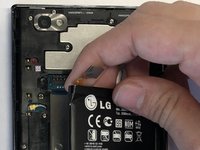
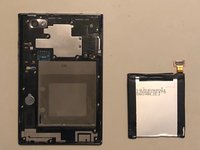
To reassemble your device, follow these instructions in reverse order.
Rückgängig: Ich habe diese Anleitung nicht absolviert.
Eine weitere Person hat diese Anleitung absolviert.

Team

UMass Dartmouth, Team S3-G4, Peak Fall 2018 Mitglied von UMass Dartmouth, Team S3-G4, Peak Fall 2018
UMASSD-PEAK-F18S3G4
3 Mitglieder
12 Anleitungen geschrieben
