Zum Hauptinhalt wechseln
Gemeinsam reparieren - Jetzt registrieren

Magic Bullet MB1001B Casing Replacement

Was du brauchst

  1. Magic Bullet MB1001B Casing Replacement, Base Gear: Schritt 1, Bild 1 von 3 Magic Bullet MB1001B Casing Replacement, Base Gear: Schritt 1, Bild 2 von 3 Magic Bullet MB1001B Casing Replacement, Base Gear: Schritt 1, Bild 3 von 3
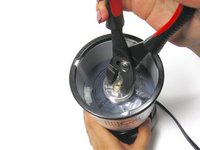
    • Use pliers to grip the gear inside of the top of the device.

    • You may have to remove a sticker that is covering the slit at the center of the bottom before completing the next step.

    • Insert a flathead screwdriver into the slit at the bottom of the device while still holding the pliers in place gripped on the gear.

    • Lay the device on its side. Holding the screwdriver stationary to hold the bottom side in place, use the pliers to unscrew the gear by turning the pliers CLOCKWISE.

    Frag FixBot
  2. Magic Bullet MB1001B Casing Replacement, Casing: Schritt 2, Bild 1 von 1
    • Remove the four rubber pegs from the feet on the base of the Magic Bullet using the spudger.

    Frag FixBot
  3. Magic Bullet MB1001B Casing Replacement: Schritt 3, Bild 1 von 1
    • Remove the four 14.0 mm Phillips head screws in the feet of the base of the Magic Bullet using the Phillips #1 screwdriver.

    Frag FixBot
  4. Magic Bullet MB1001B Casing Replacement: Schritt 4, Bild 1 von 1
    • Remove the black base plate.

    Frag FixBot
  5. Magic Bullet MB1001B Casing Replacement: Schritt 5, Bild 1 von 1
    • Remove the two 13.0 mm Phillips head screws from the white plastic cable guide using a Phillips #1 screwdriver.

    Frag FixBot
  6. Magic Bullet MB1001B Casing Replacement: Schritt 6, Bild 1 von 1
    • Remove the white plastic cable guide.

    Frag FixBot
  7. Magic Bullet MB1001B Casing Replacement: Schritt 7, Bild 1 von 1
    • Remove the three 11.0 mm Phillips head screws surrounding the white fan blade on the base using the Phillips #1 screwdriver.

    Frag FixBot
  8. Magic Bullet MB1001B Casing Replacement: Schritt 8, Bild 1 von 1
    • Remove the black base.

    Frag FixBot
  9. Magic Bullet MB1001B Casing Replacement: Schritt 9, Bild 1 von 1
    • Remove the three white rubber spacers with the spudger.

    Frag FixBot
  10. Magic Bullet MB1001B Casing Replacement: Schritt 10, Bild 1 von 1
    • Remove the three 11.0 mm Phillips head screws using the Phillips #1 screwdriver.

    Frag FixBot
  11. Magic Bullet MB1001B Casing Replacement: Schritt 11, Bild 1 von 1
    • Remove the motor.

    Frag FixBot
Abschluss

To reassemble your device, follow these instructions in reverse order.

2 weitere Personen haben diese Anleitung absolviert.

Team

Cal Poly, Team 12-13, Maness Fall 2015 Mitglied von Cal Poly, Team 12-13, Maness Fall 2015

CPSU-MANESS-F15S12G13

4 Mitglieder

8 Anleitungen geschrieben

0 Kommentare zur Anleitung

Kommentar hinzufügen

Seitenaufrufe:

Letzte 24 Stunden: 0

Letzte 7 Tage: 6

Letzte 30 Tage: 47

Insgesamt: 2,061