Zum Hauptinhalt wechseln
Gemeinsam reparieren - Jetzt registrieren

Pentax PZ-10 Back Cover Locking Switch Spring Replacement

Was du brauchst

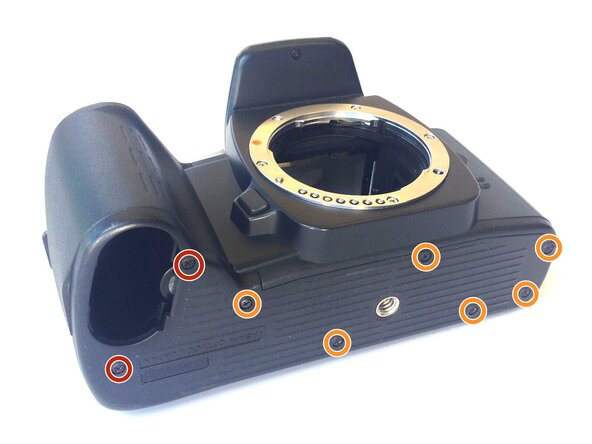
    1. Pentax PZ-10 Back Cover Locking Switch Spring Replacement, Removing the Bottom Cover: Schritt 1, Bild 1 von 1
      • With the lens face up and the bottom panel of the camera facing you, remove the two 7mm screws on the left using the J0 screwdriver.

      • Remove the six 4.3mm screws in the middle and right of the panel using the J0 screwdriver.

      • Pull off the bottom casing to remove.

      Frag FixBot

      Kommentar hinzufügen

    2. Pentax PZ-10 Back Cover Locking Switch Spring Replacement, Removing Bottom Casing: Schritt 2, Bild 1 von 1
      • With the screws removed, the bottom casing should come off very easily by pulling on the casing.

      Frag FixBot

      Kommentar hinzufügen

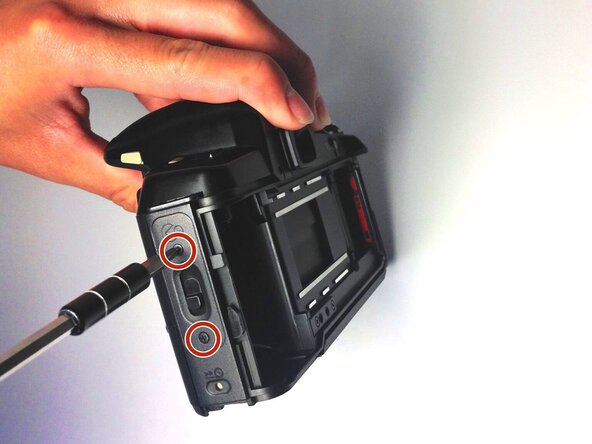
    3. Pentax PZ-10 Back Cover Locking Switch Spring Replacement, Removing the Back Cover: Schritt 3, Bild 1 von 1
      • Place the camera on its side so the lens is facing left.

      • Press down on the locking switch on the side panel facing you.

      Frag FixBot

      Kommentar hinzufügen

    4. Pentax PZ-10 Back Cover Locking Switch Spring Replacement: Schritt 4, Bild 1 von 1
      • With the door unlocked, rotate the device to access the bottom.

      Frag FixBot

      Kommentar hinzufügen

    5. Pentax PZ-10 Back Cover Locking Switch Spring Replacement: Schritt 5, Bild 1 von 1
      In diesem Schritt verwendetes Werkzeug:
      Tweezers
      $4.99
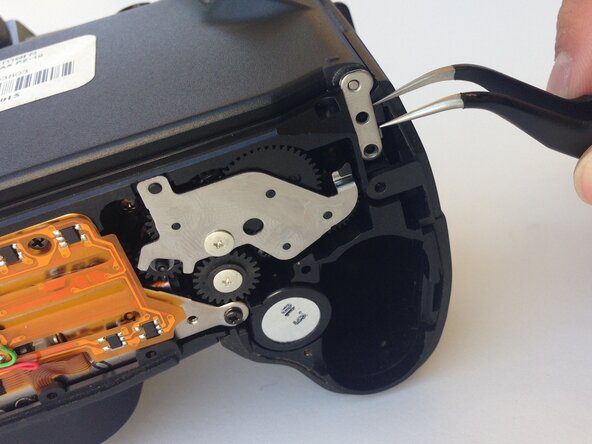
      • Using a pair of tweezers, gently remove the metal tab securing the back door axle.

      • The door will come loose at this point, watch for any loose parts that may also come out.

      Frag FixBot

      Kommentar hinzufügen

    6. Pentax PZ-10 Back Cover Locking Switch Spring Replacement, Removing the Side Panel: Schritt 6, Bild 1 von 1
      • Once the back cover is fully removed, remove the two 4.35mm screws attaching the cover of the unlocking switch, and remove the plate.

      Frag FixBot

      Kommentar hinzufügen

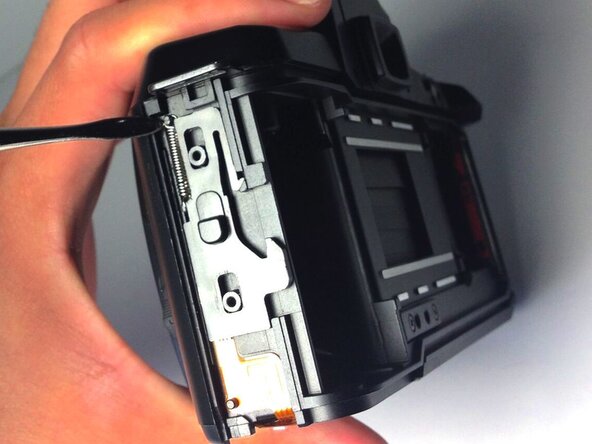
    7. Pentax PZ-10 Back Cover Locking Switch Spring Replacement, Removing the Spring: Schritt 7, Bild 1 von 1
      • Locate the spring at the upper left corner of the face, and pull the rings of the spring off of the pins to remove it using plastic opening tools.

      • You are now ready to replace the spring.

      Frag FixBot

      Kommentar hinzufügen

Abschluss

To reassemble your device, follow these instructions in reverse order.

Rückgängig: Ich habe diese Anleitung nicht absolviert.

Eine weitere Person hat diese Anleitung absolviert.

0 Kommentare zur Anleitung

Kommentar hinzufügen

Seitenaufrufe:

Letzte 24 Stunden: 1

Letzte 7 Tage: 4

Letzte 30 Tage: 18

Insgesamt: 742