Zum Hauptinhalt wechseln
Gemeinsam reparieren - Jetzt registrieren

Velocity Micro Cruz Camera Replacement

Was du brauchst

    1. Velocity Micro Cruz Camera Replacement, Remove the Back: Schritt 1, Bild 1 von 1
      • Using one of the plastic opening tools, separate the plastic back from the tablet in one spot.

      • Gently work the tool around the diameter of the tablet until the back pops completely off.

      Frag FixBot

      Kommentar hinzufügen

    2. Velocity Micro Cruz Camera Replacement, Accessing the Camera: Schritt 2, Bild 1 von 2 Velocity Micro Cruz Camera Replacement, Accessing the Camera: Schritt 2, Bild 2 von 2
      • Locate the camera as illustrated. Remove the 3 black screws at the top of the tablet.

      • Gently pull back the yellow piece so that the camera may be accessed.

      Frag FixBot

      Kommentar hinzufügen

    3. Velocity Micro Cruz Camera Replacement, Remove the Camera: Schritt 3, Bild 1 von 2 Velocity Micro Cruz Camera Replacement, Remove the Camera: Schritt 3, Bild 2 von 2
      In diesem Schritt verwendetes Werkzeug:
      Tweezers
      $4.99
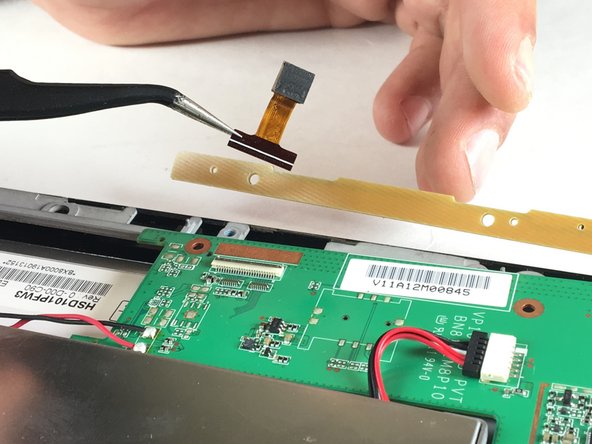
      • Use the tweezers to pull back the black latch on the motherboard that holds the camera.

      • Finally, use the tweezers to remove the camera from the motherboard.

      Frag FixBot

      Kommentar hinzufügen

Abschluss

To reassemble your device, follow these instructions in reverse order.

Rückgängig: Ich habe diese Anleitung nicht absolviert.

T Smith

Mitglied seit: 11/02/16

205 Reputation

2 Anleitungen geschrieben

0 Kommentare zur Anleitung

Kommentar hinzufügen

Seitenaufrufe:

Letzte 24 Stunden: 1

Letzte 7 Tage: 8

Letzte 30 Tage: 21

Insgesamt: 332