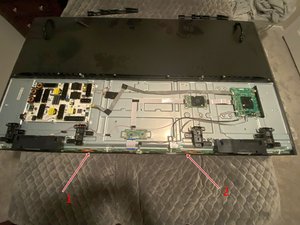
85H6510G TV turning off after a few minutes of it turning on.
Guys,
my TV has been acting up and it is now stuck. Everytiem i turn it off and on again.. it turns itself OFF after a few minutes. I noticed that when i turn it ON the power light flashes a few times.
Anyone face this issue before and if so hwo did you fix it?
Schau durch den Thread, bis du den richtigen Platz für diesen Kommentar gefunden hast. Klicke dann auf "Den Kommentar diesem Post zuordnen", um ihn zu verschieben.
@aliyousef8787 sounds like your TV is turning off because it does it's POST (Power On Self Test) and finds something not working. Time to remove the back cover and check the boards. Start by measuring the voltages rom your power board to the rest of the TV. We would need to see your boards, interconnect cables and total inside of your TV. Bilder zu einer vorhandenen Frage hinzufügen
Schematics and help from the manufacturer's is not available. they do not want you to fix the TV but want you to buy a new one. So, you have to depend on yourself. Large panel TV's like this are still having trouble with power supplies etc. so I would definitely start with that.
While you work on your TV, take lots of pictures. Once you are done with it, take those pictures and create a guide for iFixit. That will help the next person that has the same problem as you do. It's easy and fun to create these guides. https://ifixit.com/Guide/new The iFixit community will appreciate this.
Repair is War on Entropy!
Update (06/20/23)
@aliyousef8787 let's try this. Disconnect the ribbon cable from the frist driver board. then try to start your TV. Has the Behaviour changed? What does your TV show? Turn your TV off, disconnect power and reconnect that ribbon cable. Next disconnect the other ribbon cable and reapply power, turn your TV on. Has the Behaviour changed? What does your TV show?
What this does, is that it rules out the driver boards. If the behavior remains the same and your TV does exactly what it did before, we can be pretty confident that it is not the panel. Sometimes it is easier to determine what doesn't work,by finding out what does work.
Schau durch den Thread, bis du den richtigen Platz für diesen Kommentar gefunden hast. Klicke dann auf "Den Kommentar diesem Post zuordnen", um ihn zu verschieben.
15 Kommentare:
Thank you for this. I have never messed around with the control boards in the back and to be honest im not sure where to even begin. Im just going to take it to my local electronics repair shop. Im sure they will find the bad component much faster than i will!
@aliyousef8787 it is always admirable when one knows ones limits. Hopefully it will not be to complicated and will get your TV back into action quickly. If you need anything else fixed, you are in the right place. Welcome to iFixit!
@oldturkey03 so i got a quote for about $700 yikesssss... so i guess im going to do it myself. I am going to start by replacing the power board since its the cheapest board on there and it seems like i am having some power issues.
@aliyousef8787 Remove the back from your TV and post some pictures. You can do a couple of tests that make it easier to determine which board. If you got a multimeter, it'll be straight forward. My suspected sequence for a Samsung this size is usually, Main board==>Power board==>Panel
@oldturkey8787 i will wokr on it as soon as i get home today. do you think i would need to replace the entire board or you think finiding the component thats bad is doable without schematics?
Schau durch den Thread, bis du den richtigen Platz für diesen Kommentar gefunden hast. Klicke dann auf "Den Kommentar diesem Post zuordnen", um ihn zu verschieben.
I called Hisense customer support at +18889358880. The automated line made several recommendations to reset them hard reset. Those didn't work. Last it recommended downloading the firmware to a thumb drive from their web site.
Schau durch den Thread, bis du den richtigen Platz für diesen Kommentar gefunden hast. Klicke dann auf "Den Kommentar diesem Post zuordnen", um ihn zu verschieben.


 2
 1



 2,4 Tsd.