

|
1 Antwort 0 Punkte |
My Tablet on Thinkpad Helix cannot power on |
|
1 Antwort 0 Punkte |
How to reboot operating system of Android tablet? |
|
1 Antwort 0 Punkte |
Won't turn on |
|
1 Antwort 0 Punkte |
Need charger, smaller than most... |
Dokumente
Ersatzteile
- 04X0443 - Lenovo Laptop CMOS Battery - Genuine
- 60Y3305 - Lenovo Laptop Bluetooth Module - Genuine
- 45N1101 - Lenovo Laptop Battery - Genuine
- 42T5020 - Lenovo Laptop Power Cord - Genuine
- 42T5114 - Lenovo Laptop Power Cord - Genuine
- 04X0651 - Lenovo Laptop Keyboard - Genuine
- 04T0753 - Lenovo Laptop Power Cord - Genuine
- 03X6865 - Lenovo Laptop Adapter - Genuine
Hintergrund und Identifizierung
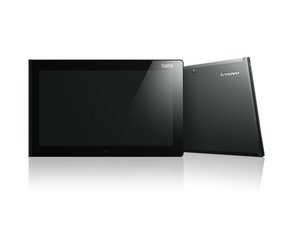
Die ThinkPad Tablet-Reihe ist eine Serie von businessorientierten Tablets, die von Lenovo unter der Marke ThinkPad entwickelt wurden, die vor allem für ihre robusten Laptops bekannt ist. Anders als klassische ThinkPad-Laptops wurden diese Tablets so konzipiert, dass sie Mobilität bieten und gleichzeitig Unternehmensfunktionen wie Verschlüsselung und Fernverwaltung beibehalten.
Das erste Modell, das ThinkPad Tablet, wurde im August 2011 veröffentlicht und lief mit Android 3.1 Honeycomb. Es enthielt Funktionen, die auf professionelle Nutzer zugeschnitten waren, wie SD-Karten-Verschlüsselung, Diebstahlschutzsoftware und Unterstützung für einen Eingabestift.
Sein Nachfolger, das ThinkPad Tablet 2, wurde im Oktober 2012 veröffentlicht und stellte auf Windows 8 Pro um. Es unterstützte vollständige Desktop-Anwendungen und markierte einen Wechsel zu Windows-basierten Hybridgeräten.
Zu den späteren Windows-Modellen gehören:
- ThinkPad Helix (2013) – Ein Hybridgerät mit abnehmbarer Tastatur und Intel-Core-Prozessoren.
- ThinkPad Helix 2 (2014) – Eine dünnere, leichtere Version mit verbesserter Akkulaufzeit.
- ThinkPad X201 Tablet – Ein konvertierbarer Laptop mit drehbarem Bildschirm, der die Lücke zwischen traditionellen Laptops und Tablets schließt.
Weitere Modelle wie das ThinkPad 8 und das ThinkPad 10 waren ebenfalls Teil der breiteren ThinkPad-Tablet-Reihe und boten oft Unterstützung für Windows 8 sowie Zubehör wie abnehmbare Tastaturen und Dockingstationen.
Gerätemodellnummern befinden sich typischerweise auf einem Aufkleber auf der Rückabdeckung oder innerhalb der Systemeinstellungen unter „Info zu diesem Gerät“.
Zusätzliche Informationen
Lenovo ThinkPad Tablet 2 Bedienungsanleitung
Lenovo ThinkPad Tablet 2 Benutzerhandbuch
ThinkPad Tablet Benutzerhandbuch
Lenovo ThinkPad Tablet 2 Windows 8 Pro Produktbroschüre
Lenovo ThinkPad Tablet 2 Windows 8 Produktbroschüre
Lenovo ThinkPad Tablet 2 Produktdatenblatt
Lenovo ThinkPad Tablet 1839 16–64GB Wi-Fi und 3G PSREF Spezifikationen
Lenovo ThinkPad TopSeller Notebooks Personal Systems Reference (Mai 2013, Version 436)
Lenovo ThinkPad Tablets and Convertibles Produktspezifikationsreferenz (Mai 2014)
Lenovo ThinkPad Tablet 2 – Produktbroschüre
Lenovo ThinkPad Tablets and Convertibles Produktspezifikationsreferenz (Februar 2015)
Lenovo ThinkPad Tablet 2 Produktdatenblatt
ThinkPad TopSeller Notebooks Personal Systems Reference, Version 426
Lenovo ThinkPad TopSeller Notebooks Personal Systems Reference, März 2012
Lenovo ThinkPad Tablet 2 Produktspezifikationsreferenz
Lenovo ThinkPad TopSeller Notebooks Personal Systems Reference — Mai 2012, Version 417
ThinkPad TopSeller Notebooks Personal Systems Reference (August 2013, Version 441)
Lenovo ThinkPad Tablets and Convertibles Produktspezifikationsreferenz
ThinkPad TopSeller Notebooks Personal Systems Reference, Juli 2013, Version 439
ThinkPad TopSeller Notebooks Produktspezifikationsreferenz, Version 446
Lenovo ThinkPad Tablet 2 Produktspezifikationsreferenz
Lenovo® ThinkPad® Notebooks Personal Systems Reference (Westeuropa, Mai 2013)
ThinkPad TopSeller Notebooks Produktspezifikationsreferenz
Lenovo ThinkPad Tablet 10 Windows 8.1 Produktbroschüre
Lenovo ThinkPad Tablets and Convertibles Produktspezifikationsreferenz Januar 2015
Lenovo ThinkPad Tablet 2 Produktbroschüre
Lenovo ThinkPad Tablet Android 3.1 Produktdatenblatt