Beliebte Fragen im Forum
Eine Frage stellenEs gibt noch keine Fragen. Stelle du die erste!
Hintergrund
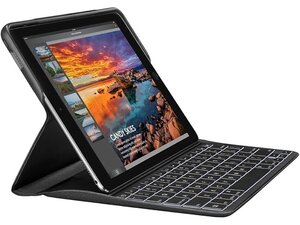
Das Logitech CREATE ist ein Tastatur-Case mit Hintergrundbeleuchtung, das speziell für das iPad Pro 9,7 Zoll (Modell von 2016) entwickelt wurde. Es wird über den Apple Smart Connector mit dem Tablet verbunden, wodurch es direkt mit Strom versorgt wird und ohne Bluetooth oder einen internen Akku direkt mit dem iPad kommuniziert. Das Case besteht aus strapazierfähigem Stoff und Kunststoff und umfasst eine passgenaue Tastatur mit einstellbarer Hintergrundbeleuchtung, eine dedizierte Reihe für iOS-Kurzbefehle sowie eine integrierte Apple Pencil-Halterung aus Stoff. Das schützende Case bewahrt beide Seiten des iPad vor Stößen, Schmutz und Stürzen und bietet gleichzeitig ein flaches Tippgefühl.
Identifizierung
Das Logitech CREATE lässt sich anhand seiner Modellnummer (M/N Y-U0030) identifizieren. Das Modell-Etikett befindet sich normalerweise auf der Unterseite des Case. Die Seriennummer (S/N) des Geräts erscheint in der Nähe auf demselben Etikett.
Spezifikationen
- Formfaktor: Tastaturabdeckung / Folio-Case für iPad Pro 9,7 Zoll (2016)
- Kompatibilität: Apple iPad Pro 9,7 Zoll (Modell 2016) – passt nicht für andere iPad-Modelle
- Konnektivität: Apple Smart Connector (direkte Strom- und Datenübertragung; keine Bluetooth-Kopplung erforderlich)
- Tastentyp: Scheren-/Membran-Tasten (Hersteller/Modell von Logitech nicht spezifiziert)
- Tastenabstand / Tastenhub: 19 mm Tastenabstand; 1,3 mm Tastenhub
- Hintergrundbeleuchtung: Einstellbare Hintergrundbeleuchtung; Produktbeschreibung weist auf RGB-Farbunterstützung/einstellbare Farben hin
- Materialien: Stoff-Außenseite mit Tastaturgehäuse aus Kunststoff
- Besondere Merkmale: Dedizierte Reihe für iOS-Kurzbefehle, Medien-/Lautstärkeregler, iPad-Ruhezustand/Aufwecken über Smart Connector, integrierte Apple Pencil-Halterung aus Stoff
- Stromversorgung: Stromversorgung über Apple Smart Connector vom iPad (kein interner Akku)
- Garantie: 1 Jahr eingeschränkte Hardware-Garantie (Logitech)
- Komponenten-Modellnummern / Ersatzteile: Der Logitech-Support listet keine Ersatzteile oder Komponenten-Modellnummern für das CREATE auf; wird ausschließlich als 'CREATE' Tastatur-Case vermarktet
Fehlerdiagnose
Häufige reparaturrelevante Fehler sind Ausfälle der Hintergrundbeleuchtung, nicht reagierende Tasten und Probleme mit den Kontakten des Smart Connector. Zur Diagnose die Kontaktpads des Smart Connector reinigen und prüfen, die Tastatur mit einem iPad mit bekanntlich funktionierendem Smart Connector testen und die Einstellungen der Hintergrundbeleuchtung überprüfen; physische Schäden an der Tastaturmembran oder den Kontakten erfordern normalerweise einen Modulaustausch oder Service im Rahmen der Garantie.
Für weitere Hilfe zur Fehlerdiagnose besuche: https://support.logi.com/hc/en-us
Zusätzliche Informationen
Garantieinformationen
1 Jahr eingeschränkte Hardware-Garantie (siehe Artikel des Logitech-Supports/Garantie für CREATE)

