Beliebte Fragen im Forum
Eine Frage stellenEs gibt noch keine Fragen. Stelle du die erste!
Hintergrund
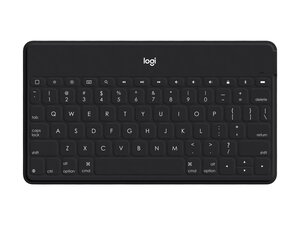
Die Logitech Keys‑To‑Go ist eine ultra-mobile, flache Bluetooth-Tastatur, die hauptsächlich für Apple-Geräte und Tippen unterwegs konzipiert ist. Sie ist etwa 24 cm lang und nur 6,3 mm dick, was Tragbarkeit und ein schmales Profil betont. Die Tastatur verwendet strapazierfähige, leichte Materialien und eine schützende Außenhülle, die für den täglichen Transport und gelegentliche Abnutzung der Oberfläche ausgelegt ist. Zu den Hauptmerkmalen gehören drahtlose Bluetooth-Verbindungen, ein kompaktes US-QWERTY-Layout sowie ein integrierter Ständer und Kompatibilität mit Smartphones und Tablets.
Identifizierung
Die Logitech Keys-To-Go kann anhand der Modellnummer (M/N Y-R0052) identifiziert werden. Das Modellschild befindet sich auf der Unterseite (Beispiele: 920-006701, 920-010040). Dieses Schild listet die Modellnummer (M/N), Teilenummer (P/N) und Seriennummer (S/N) auf.
Spezifikationen
- Formfaktor: Ultra-mobile, ultradünne tragbare Bluetooth-Tastatur
- Abmessungen: 24 cm lang; 6,3 mm dick
- Material: Strapazierfähige, leichte Stoff-/Soft-Touch-Außenhülle mit flexiblem internem Kunststoff-Gehäuse (Logitech beschreibt nachhaltige Materialien; exakte Zusammensetzung nicht offengelegt)
- Tastenschalter: Flache Scheren-/Membran-Tastenschalter (Hersteller/Modell von Logitech nicht offengelegt)
- Konnektivität: Drahtlose Bluetooth-Verbindung (Multi-Device-Pairing; exakte Bluetooth-Version auf der Produktseite nicht angegeben)
- Layout / Modelle: Englisch US-QWERTY; zu den Modell-SKUs gehören 920-006701 (Schwarz mit weißem iPhone-Ständer) und 920-010040 (Klassisch Blau mit orangefarbenem iPhone-Ständer)
- Akku: Integrierter wiederaufladbarer Akku (Logitech gibt auf der Produktseite keine Kapazität oder detaillierte Ladespezifikation an)
- Hintergrundbeleuchtung: Keine (keine beleuchteten Tasten)
- Kompatibilität: Entwickelt für eine nahtlose Zusammenarbeit mit mobilen Apple-Geräten, iPad, iPhone, anderen mobilen Geräten, Computern und Smart-TVs (OS-Unterstützung variiert)
- Bluetooth-Reichweite: Typische Bluetooth-Reichweite für Endverbraucher (~10 m); exakte Reichweite/Version nicht spezifiziert
Fehlerdiagnose
Häufige reparaturrelevante Fehler sind Probleme bei der Bluetooth-Kopplung, Tasten, die aufgrund von Schmutz oder Verschleiß nicht oder nur zeitweise reagieren, sowie Akku- oder Ladeprobleme. Zur Diagnose überprüfe die Bluetooth-Kopplung sowie die Power-/Status-LED, lade den internen Akku auf und versuche einen Reset. Wenn Tasten nicht reagieren, öffne das Gehäuse, um das Flachbandkabel und die Verbindungen auf der Platine auf Schäden oder Korrosion zu untersuchen.
Für weitere Hilfe bei der Fehlerdiagnose besuche: Besuche https://support.logi.com für Produktsupport, Registrierung und Fehlerdiagnose-Artikel speziell für Keys-To-Go.
Zusätzliche Informationen
Garantieinformationen
Logitech bietet eine regionsabhängige eingeschränkte Herstellergarantie – überprüfe die Logitech-Garantieseite auf Dauer und Bedingungen.

