Beliebte Fragen im Forum
Eine Frage stellenEs gibt noch keine Fragen. Stelle du die erste!
Hintergrund
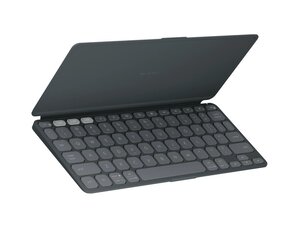
Das Keys-To-Go 2 ist eine ultraschlanke, tragbare Tablet-Tastatur von Logitech, die für mobiles Tippen auf Tablets, Smartphones und Laptops entwickelt wurde. Sie bietet geräumige, komfortable Tasten mit niedrigem Profil in einem kompakten Format sowie eine integrierte Abdeckung, um die Tasten während des Transports zu schützen. Das Gehäuse besteht aus recyceltem Kunststoff und ist auf Langlebigkeit ausgelegt, was eine leichte und dennoch robuste Oberfläche für den häufigen mobilen Einsatz bietet. Zu den Hauptmerkmalen zählen universelle Bluetooth-Konnektivität, ein schlankes, leichtes Design und eine laut Hersteller lange Akkulaufzeit.
Identifizierung
Das Logitech Keys-To-Go 2 lässt sich anhand der Modellnummer (M/N YR0100) identifizieren. Das Modellschild befindet sich auf der Unterseite der Tastatur. Dieses Schild listet die Modellnummer (M/N), die Teilenummer (P/N) und die Seriennummer (S/N) auf.
Spezifikationen
- Formfaktor: Ultraschlanke, tragbare Tablet-Tastatur (integrierte Abdeckung)
- Layout: Kompaktes Layout in voller Größe mit geräumigen Tasten mit niedrigem Profil (englische QWERTY-Varianten)
- Schaltertyp: Membrantasten mit Scherentechnologie und niedrigem Profil (Hersteller legt kein diskretes mechanisches Schaltermodell offen)
- Hersteller/Modell des Tastenschalters: Nicht von Logitech offengelegt
- Konnektivität: Bluetooth (universelle Kompatibilität mit Android, Chrome OS, Windows, iPadOS/iOS, macOS)
- Materialien: Gehäuse aus recyceltem Kunststoff; schlanke stoffartige Oberseite und schützende integrierte Abdeckung
- Modell / SKU / MPN: 920-012867 (Graphite), 920-012919 (Pale Gray), 920-012920 (Lilac)
- Akku: Hersteller gibt eine lange Akkulaufzeit an; spezifische Akkutechnologie und Kapazität nicht offengelegt
- Hintergrundbeleuchtung: Nicht aufgeführt (keine Hintergrundbeleuchtung auf der Produktseite angegeben)
- Gewicht & Abmessungen: Kompaktes, leichtes Design; genaue Abmessungen/Gewicht nicht auf der Produktseite angegeben
Fehlerdiagnose
Häufige reparaturrelevante Fehler sind Probleme bei der Bluetooth-Kopplung, nicht reagierende oder klemmende Tasten durch Schmutz oder Abnutzung der Membran sowie Fehler beim Akku oder Ladevorgang. Führe eine Diagnose durch, indem du die Kopplung mit einem zweiten Gerät testest, den Ein-/Ausschalter sowie den Bluetooth-Status prüfst, die Tastenoberfläche untersuchst und reinigst und die Akkufunktion (Ein-/Ausschalten und Kontrollleuchte für den Ladevorgang) überprüfst.
Für weitere Hilfe bei der Fehlerdiagnose besuche: Besuche https://support.logi.com für Produktsupport, Registrierung und Kontaktoptionen.
Zusätzliche Informationen
Garantieinformationen
Die Garantie variiert je nach Region; überprüfe die Garantieseite von Logitech (Link oben) für spezifische Bedingungen der eingeschränkten Herstellergarantie.

