|
1 Antwort 0 Punkte |
keyboard stop responding and cannot operate |
Hintergrund
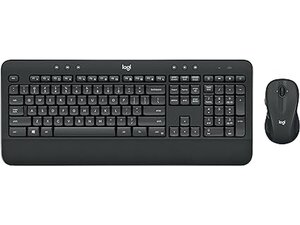
Das kabellose MK545 ADVANCED Tastatur- und Maus-Set ist ein Desktop-Set von Logitech in voller Größe, das für Produktivität zu Hause und im Büro entwickelt wurde. Es kombiniert eine vollständige Tastatur mit integrierter Handballenauflage und eine Lasermaus für Rechtshänder. Es nutzt den kabellosen 2,4-GHz-Unifying-USB-Empfänger von Logitech und bietet Multimedia-Sondertasten für den schnellen Zugriff auf häufige Funktionen. Die Geräte bestehen aus robustem Kunststoff mit einem stabilen Gehäuse und verstärkten Tastenkappen für den langfristigen täglichen Gebrauch. Zu den Hauptmerkmalen gehören ein Ziffernblock, dedizierte Mediensteuerungen und eine Laser-Abtastung bei der mitgelieferten Maus.
Identifizierung
Das kabellose Logitech MK545 ADVANCED Tastatur- und Maus-Set umfasst die Tastatur (M/N Y-R0012), die Maus (M/N MR0108) und den USB-Empfänger (M/N C-U0007). Die Modellschilder befinden sich an folgenden Stellen – Tastatur: auf dem Produktetikett an der Unterseite; Maus: auf dem Produktetikett an der Unterseite; USB-Empfänger: aufgedruckt auf der flachen Seite oder der Seite des Empfängergehäuses in der Nähe des USB-Steckers. Jede Komponente besitzt ihre eigene Modellnummer (M/N) und Seriennummer (S/N).
Spezifikationen
- Formfaktor: Tastatur in voller Größe mit integrierter Handballenauflage und separater Maus für Rechtshänder
- Artikel-/Modellnummer: 920-008695 (ASIN B079HR85C3)
- Konnektivität: 2,4 GHz drahtlose Verbindungen (Logitech Unifying USB-Empfänger enthalten)
- Kompatibilität mit Betriebssystem: Windows 7, 10, 11 oder neuer; Chrome OS (wie auf der Produktseite angegeben)
- Tastenschaltertyp: Membran mit Scheren-Stabilisatoren (Hersteller auf Produkt-/Supportseiten nicht angegeben)
- Maus-Sensor: Laser-Bewegungserkennung
- Stromversorgung/Batterien: Batteriebetrieben – Tastatur benötigt 2× AAA (enthalten); Batterietyp der Maus im Angebot nicht spezifiziert
- Abmessungen (Tastatur L×B×H): 47,19 × 20,09 × 7,39 cm (ungefähre Abmessungen laut Produktangebot)
- Gewicht: Ca. 907 g (Artikelgewicht wie gelistet)
- Farbe: Schwarz
- Besonderheiten: Multimedia-Sondertasten, integrierte Handballenauflage, Unifying-Empfänger enthalten, kompatibel mit Handgelenkauflagen
Fehlerdiagnose
Häufige reparaturrelevante Fehler sind leere/schwache Batterien, verlorene drahtlose Kopplung, klemmende oder nicht reagierende Tasten sowie Probleme mit der Maus-Abtastung durch Verschmutzung. Führe eine Diagnose durch, indem du die Batterien austauschst oder auffrischst, den Unifying-Empfänger an einem anderen USB-Anschluss oder an einem anderen Gerät testest und neu koppelst, unter den Tastenkappen und am Maus-Sensor reinigst sowie die Durchgängigkeit der Tasten prüfst, falls einzelne Schalter ausfallen.
Für weitere Hilfe bei der Fehlerdiagnose besuche: Besuche den Logitech Support (https://support.logi.com) für Produktregistrierung, Kontaktmöglichkeiten und Geräteunterstützung.
Weitere Informationen
Garantieinformationen
Der Garantieumfang variiert je nach Region; konsultiere die Garantieseite von Logitech oder deinen Händler für die Bedingungen und um einen Anspruch geltend zu machen.

