Beliebte Fragen im Forum
Eine Frage stellenEs gibt noch keine Fragen. Stelle du die erste!
Hintergrund
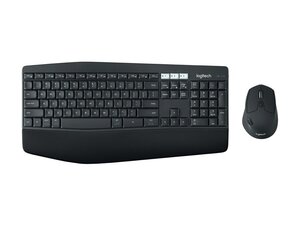
Das Logitech MK850 Performance ist ein Set aus einer Tastatur in Standardgröße und einer Maus. Es wurde für Komfort und Produktivität entwickelt und verfügt über eine gepolsterte Handballenauflage, konturierte Tasten und eine ergonomisch geformte Maus für die längere Nutzung. Es unterstützt das Umschalten zwischen mehreren Geräten, sodass Anwender zwischen bis zu drei gekoppelten Geräten wechseln können. Das Design verwendet langlebige Materialien, die dem täglichen Büroalltag standhalten sollen, und betont Langlebigkeit und Nachhaltigkeit in der Konstruktion. Zu den Hauptmerkmalen gehören die Steuerung mehrerer Geräte, ein Nano-USB-Empfänger und eine lange Akkulaufzeit.
Identifizierung
Die Logitech MK850 Performance Wireless Keyboard and Mouse Combo besteht aus Tastatur (M/N Y-R0061), Maus (M/N M-R0062) und USB-Empfänger (M/N C-U0007). Die Modellbezeichnungen befinden sich an folgenden Stellen: Tastatur: auf dem Produktetikett an der Unterseite; Maus: auf dem Produktetikett an der Unterseite; USB-Empfänger: aufgedruckt auf der flachen Seite oder der Seite des Empfängergehäuses nahe dem USB-Stecker. Jede Komponente besitzt eine eigene Modellnummer (M/N) und Seriennummer (S/N).
Spezifikationen
- Formfaktor: Ergonomische Tastatur in Standardgröße mit gepolsterter Handballenauflage und konturierter Maus
- Modell / SKU: 920-008219 (MPN 920-008219)
- Schaltertyp: Membran mit Scherenmechanik (Hersteller nicht angegeben)
- Schalterhersteller: Nicht von Logitech angegeben (proprietäres Membran-/Scherendesign)
- Konnektivität: Logitech Unifying Nano-USB-Empfänger (2,4 GHz) und Bluetooth-Umschaltung für mehrere Geräte
- Maussensor: Optischer Sensor (Hersteller/Modell nicht angegeben; typische Empfindlichkeit bis ca. 1000 DPI)
- Batterie: Tastatur: 2 × AAA; Maus: 1 × AA (vom Benutzer austauschbar)
- Kompatibilität: Windows, macOS, Chrome OS, iPadOS; Kopplung mehrerer Geräte über Computer, Tablets und Telefone hinweg
- Lieferumfang: Tastatur, konturierte Maus, Logitech Unifying Nano-Empfänger (in der Maus verstaut), Dokumentation
- Farbe / Ausführung: Schwarz mit texturierter Kunststoffkonstruktion und gepolsterter Handballenauflage (haltbare Formkunststoffe)
Fehlerdiagnose
Zu den gängigen, für Reparaturen relevanten Fehlern gehören nicht reagierende Tasten (oft aufgrund abgenutzter Membranen, Schmutz unter den Tasten oder Batterie-/Kontaktproblemen) sowie Ausfälle bei drahtlosen Verbindungen (Probleme bei der Kopplung des Empfängers oder leere Batterien). Zur Diagnose empfiehlt es sich, frische Batterien einzulegen, den Nano-Empfänger neu zu koppeln, Tastenkappen zu entfernen, um das Tastenbett und die Kontakte zu prüfen/reinigen, sowie den Maussensor auf Verschmutzungen oder mechanischen Verschleiß zu testen.
Für weitere Hilfe bei der Fehlerdiagnose besuche: Besuche https://support.logi.com für Produktsupport, Treiber und die Logi Options+ Software.
Zusätzliche Informationen
Garantieinformationen
Eingeschränkte Hardwaregarantie; typische Abdeckung 1–2 Jahre je nach Region. Überprüfe die Logitech-Garantieseite für regionale Details.

