Beliebte Fragen im Forum
Eine Frage stellenEs gibt noch keine Fragen. Stelle du die erste!
Hintergrund
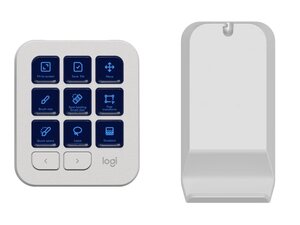
Die MX Creative Console ist ein Zubehör von Logitech für kreative Arbeitsabläufe und die Steuerung von Präsentationen. Sie kombiniert physische Bedienelemente und programmierbare Eingaben, um App-spezifische Kurzbefehle und Mediensteuerung zu vereinfachen. Das Gerät besteht aus langlebigen Materialien, einschließlich verstärktem Kunststoff und Metallakzenten, um der häufigen Nutzung am Schreibtisch standzuhalten. Zu den Hauptmerkmalen gehören die Konnektivität für mehrere Geräte und die Integration von Logi Options+ für Anpassungen.
Identifizierung
Die Logitech MX CREATIVE CONSOLE lässt sich anhand der Modellnummer (M/N YR0097) identifizieren. Das Modellschild befindet sich am Empfängergehäuse. Dieses Etikett listet die Modellnummer (M/N), die Teilenummer (P/N) und die Seriennummer (S/N) auf.
Spezifikationen
- Formfaktor: Eigenständige Kreativ-Konsole (Schreibtischzubehör)
- Konnektivität: Bluetooth Low Energy; USB-A-Empfänger (Logi Bolt/Unifying, falls vorhanden) – genaues Empfängermodell nicht aufgeführt
- Stromversorgung / Akku: Wiederaufladbarer interner Akku (Kapazität von Logitech nicht spezifiziert)
- Ladeanschluss: USB-C (Ladekabel erforderlich; spezifisches Kabel nicht aufgeführt)
- Materialien: Gehäuse aus verstärktem Kunststoff mit Metallakzenten/Rahmen für Langlebigkeit
- Bedienelemente: Programmierbare Tasten, Drehregler/Drehräder und Touch-Bedienelemente (genaue Art der Tastenschalter nicht aufgeführt)
- Tastenschalter-Hersteller/Modell: Nicht von Logitech aufgeführt (das Gerät verwendet Membran- bzw. Soft-Switch-Bedienelemente anstelle von diskreten mechanischen Tastenschaltern)
- Kompatibilität: Unterstützt Windows und macOS; konfigurierbar über Logi Options+
- Abmessungen: Von Logitech nicht spezifiziert
- Gewicht: Von Logitech nicht spezifiziert
Fehlerdiagnose
Zu den häufigen reparaturrelevanten Fehlern gehören nicht reagierende Bedienelemente, Ladefehler sowie Probleme bei der Bluetooth- oder Empfänger-Kopplung. Zur Diagnose sollte die Verbindung zu Logi Options+ und der Firmwarestatus geprüft, das USB-C-Kabel und der Ladestrom verifiziert, die Bluetooth-Verbindung neu hergestellt bzw. der USB-Empfänger neu eingesteckt und das Etikett an der Unterseite auf Modell- oder FCC-IDs zur Suche nach Serviceinformationen inspiziert werden.
Für weitere Hilfe bei der Fehlerdiagnose besuche: Siehe https://support.logi.com für Produktsupport, Kontaktmöglichkeiten und Logi Options+-Software.
Zusätzliche Informationen
Garantieinformationen
Standardmäßige beschränkte Herstellergarantie von Logitech – siehe Logitech-Garantieseite für regionsspezifische Bedingungen.

