Beliebte Fragen im Forum
Eine Frage stellenEs gibt noch keine Fragen. Stelle du die erste!
Hintergrund
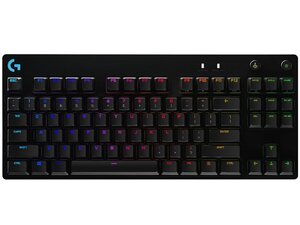
Das PRO Gaming Keyboard ist eine auf kompetitive Nutzung ausgerichtete Tenkeyless-Tastatur aus Logitechs G-Serie, die für E-Sports und LAN-Partys entwickelt wurde. Sie kombiniert ein kompaktes Layout und kabelgebundene Konnektivität mit niedriger Latenz sowie eine RGB-Einzeltastenbeleuchtung und integrierten Profilspeicher. Die Tastatur besteht aus langlebigen Materialien, darunter eine Aluminium-Oberplatte und ein abnehmbares, stoffummanteltes Kabel, um Stabilität und Langlebigkeit zu erhöhen. Zu den Hauptmerkmalen gehören mechanische Logitech Romer‑G-Switches, vollständiges Anti-Ghosting/N-Key-Rollover sowie anpassbare Beleuchtung und Makros über die Logitech-Software.
Identifizierung
Das Logitech PRO Gaming Keyboard lässt sich anhand der Modellnummer (M/N YU0039) identifizieren. Das Modell- und Zulassungsetikett befindet sich auf der Unterseite des Gehäuses. Das Etikett enthält den Produktnamen und die Modellnummer; das abnehmbare Kabel wird an der vorderen Mitte der Tastatur eingesteckt. Auf diesem Etikett sind die Modellnummer (M/N), die Teilenummer (P/N) und die Seriennummer (S/N) aufgeführt.
Spezifikationen
- Formfaktor: Tenkeyless (TKL), 87 Tasten
- Switch-Typ: Mechanische Logitech Romer‑G-Switches
- Auslöseweg / Tastenhub: Auslöseweg 1,5 mm; gesamter Tastenhub 3,2 mm (Romer‑G-Spezifikation)
- Konnektivität: Kabelgebundenes USB (abnehmbares stoffummanteltes Kabel, USB-A auf Micro‑USB)
- Hintergrundbeleuchtung: RGB-Einzeltastenbeleuchtung, anpassbar über die Logitech-Software (G HUB/Options)
- Onboard-Speicher: Integrierter Profilspeicher für Beleuchtung und Makros
- Key-Rollover: Vollständiges Anti‑Ghosting / N‑Key-Rollover via USB
- Tastenkappen-Material: ABS-Tastenkappen (standardmäßiges OEM-Profil)
- Material der Gehäuseoberseite: Oberplatte aus flugzeugtauglichem Aluminium und verstärktem Kunststoffboden (langlebige Materialien)
- Kabel: Abnehmbares stoffummanteltes USB-Kabel (ca. 1,8 m)
Fehlerdiagnose
Häufige, für Reparaturen relevante Defekte sind nicht reagierende oder klemmende Tasten (oft verursacht durch Schmutz unter den Tastenkappen oder defekte Switches), Ausfälle der Beleuchtung sowie ein beschädigtes oder abgelöstes USB-Kabel. Zur Diagnose die Tastenkappen entfernen, um auf Verschmutzungen zu prüfen, die Switches mit einer bekanntermaßen funktionierenden Taste oder einem Multimeter testen, das abnehmbare Kabel neu einsetzen oder austauschen und die Tastatur an einem anderen USB-Anschluss oder PC testen.
Für weitere Hilfe bei der Fehlerdiagnose besuche: https://support.logi.com für Treiber, Software (Logi Options+/G HUB) und Produktsupport.
Zusätzliche Informationen
Garantieinformationen
Die begrenzte Hardwaregarantie variiert je nach Region; prüfe die Logitech-Garantieinformationen auf support.logi.com bezüglich Abdeckung und Anspruchsverfahren.

