Beliebte Fragen im Forum
Eine Frage stellenEs gibt noch keine Fragen. Stelle du die erste!
Hintergrund
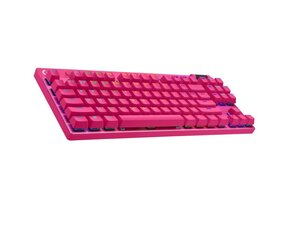
Das PRO X Gaming Keyboard ist eine leistungsorientierte mechanische Tastatur, die für E-Sport und kompetitives Spielen vermarktet wird. Sie bietet austauschbare mechanische Schalter, eine RGB-Hintergrundbeleuchtung für jede Taste sowie einen internen Profilspeicher für Makros und Tastenbelegungen. Das Gehäuse verwendet langlebige Materialien und eine verstärkte Halterung, um starker täglicher Beanspruchung standzuhalten. Zu den Hauptmerkmalen gehören ein abnehmbares Kabeldesign, ein kompaktes TKL-Layout (bei der TKL-Variante) sowie die Kompatibilität mit der Logitech G Software zur individuellen Anpassung.
Identifizierung
Das Logitech PRO X Gaming Keyboard kann anhand der Modellnummer (M/N YU0037) identifiziert werden. Das Modellschild befindet sich auf der Unterseite der Tastatur. Dieses Etikett listet die Modellnummer (M/N), die Teilenummer (P/N) und die Seriennummer (S/N) auf.
Spezifikationen
- Formfaktor: Tenkeyless (TKL)-Variante, häufig als PRO X TKL verkauft; Full-Size-Varianten in einigen Bundles enthalten
- Schaltertyp: Logitech GX (taktil) – GX Brown Tactile (Logitech G-gebrandete Schalter, Kailh OEM)
- Im laufenden Betrieb austauschbar: Im laufenden Betrieb austauschbare Schalteranschlüsse (unterstützt GX 3-Pin-Schalter; ermöglicht den Schaltertausch ohne Löten)
- Tastenkappen: Sculpted-ABS-Tastenkappen (OEM-Profil) mit transluzenten Beschriftungen für RGB-Beleuchtung
- Hintergrundbeleuchtung: RGB-Beleuchtung pro Taste (Logitech LIGHTSYNC)
- Konnektivität: Kabelgebundenes USB mit abnehmbarem Kabel (abnehmbares USB-C-Kabel bei neueren Chargen; ursprüngliche Verkaufseinheiten verwendeten ein abnehmbares USB-Kabel)
- Interner Speicher: Interner Speicher zum Speichern mehrerer Profile (Makro- und Beleuchtungsprofile)
- Anti-Ghosting / Rollover: N-Key-Rollover und 1000 Hz Polling-Rate (USB-Polling bis zu 1 ms)
- Software / Firmware: Konfigurierbar mit Logitech G HUB (Firmware-Updates und Profilverwaltung)
- Gehäusematerialien: Gehäuseoberseite aus verstärktem Kunststoff und plattenmontiertes Design mit stahlverstärkten Befestigungspunkten für Langlebigkeit
Fehlerdiagnose
Zu den häufigen reparaturrelevanten Fehlern gehören einzelne Schalterausfälle (stumm/keine Betätigung oder Doppelauslösung), ein nicht reagierender USB-/Anschlusskabeldefekt sowie RGB-/Firmware-Probleme. Diagnostiziere das Problem, indem du die Tastenkappen entfernst, um die Schalter zu untersuchen, den verdächtigen Schalter gegen einen bekanntermaßen funktionierenden Anschluss austauschst (oder einen Schaltertester verwendest) und ihn mit einem alternativen USB-Kabel/-Anschluss testest; bei Firmware-Problemen überprüfe den Logitech G HUB und installiere Updates.
Für weitere Hilfe bei der Fehlerdiagnose besuche: Besuche support.logi.com für Downloads, Firmware-Updates und Kontaktmöglichkeiten für den Logitech-Support.
Zusätzliche Informationen
Garantieinformationen
Die eingeschränkte Hardwaregarantie variiert je nach Region (normalerweise 1–2 Jahre); konsultiere die Garantieinformationen von Logitech auf der Support-Website.

