Beliebte Fragen im Forum
Eine Frage stellenEs gibt noch keine Fragen. Stelle du die erste!
Hintergrund
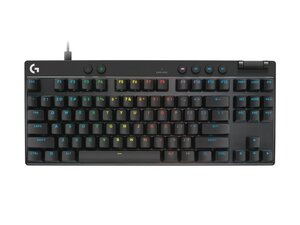
Die PRO X TKL RAPID ist eine mechanische Tenkeyless-Tastatur, die sich an wettbewerbsorientierte Spieler und Enthusiasten richtet und ein kompaktes Layout sowie ein direktes Tastenansprechverhalten bietet. Sie besteht aus langlebigen Materialien (verstärktes Kunststoffgehäuse mit einer Metallrückplatte), um intensiver Nutzung und langen Gaming-Sessions standzuhalten. Zu den Hauptmerkmalen gehören mechanische Schalter, programmierbare Beleuchtung und Makros sowie die Unterstützung eines abnehmbaren Kabels für bessere Mobilität. Die Support-Seite von Logitech bietet nur eingeschränkt herunterladbare Ressourcen, verweist Nutzer jedoch auf allgemeine Garantie- und Support-Informationen.
Identifizierung
Die Logitech PRO X TKL RAPID lässt sich anhand ihrer Modellnummer (M/N YU0090) identifizieren. Das Modell-Etikett sowie regulatorische Kennzeichnungen befinden sich üblicherweise auf der Unterseite. Die Seriennummer (S/N) des Geräts ist in der Nähe auf demselben Etikett zu finden.
Spezifikationen
- Formfaktor: Tenkeyless (TKL, 87 Tasten) – kompaktes Gaming-Layout
- Schaltertyp: Nicht auf der Logitech-Support-Seite angegeben (Hersteller/Modell nicht gelistet) – siehe Produktverpackung oder Etikett für das genaue Schaltermodell
- Tastenkappen: Nicht auf der Logitech-Support-Seite angegeben (Material auf der Produktseite prüfen; oft ABS oder PBT)
- Konnektivität: Nicht vollständig auf der Support-Seite dokumentiert – prüfen Sie die Produktbeschreibung auf kabelgebundene (USB-C abnehmbar) und/oder drahtlose Optionen
- Hintergrundbeleuchtung: Programmierbares RGB (Produktbeschreibung/Support-Software für Konfiguration erforderlich) – genaue Beleuchtungsmodi auf der Support-Seite nicht detailliert
- Abtastrate: Nicht auf der Support-Seite aufgeführt (typische Gaming-Tastaturen: 1000 Hz)
- Interner Speicher: Nicht auf der Support-Seite dokumentiert; siehe Produktdokumentation für Details zur Speicherung von Profilen direkt auf dem Gerät
- Abmessungen: Nicht auf der Support-Seite aufgeführt (siehe Einzelhandels-/Produktseite für exakte Breite/Höhe/Tiefe)
- Gewicht: Nicht auf der Support-Seite aufgeführt (siehe Einzelhandels-/Produktseite)
- Mitgeliefertes Zubehör: Die Support-Seite listet keine Ersatzteile oder Zubehör auf; prüfen Sie die Verkaufsverpackung auf Modellnummern für Tastenkappenabzieher, abnehmbares Kabel und den Funkempfänger, falls diese enthalten sind
Fehlerdiagnose
Zu den häufigen reparaturrelevanten Fehlern gehören nicht reagierende Tasten, klemmende oder laute Schalter sowie Konnektivitätsprobleme. Schritte zur Diagnose: Entferne die Tastenkappen, um einzelne Schalter zu testen, probiere alternative USB-Anschlüsse aus oder verbinde die drahtlose Verbindung erneut. Überprüfe das Etikett auf der Unterseite auf Modell-/Serieninformationen, um Ersatzteillisten abzugleichen. Stelle vor einem Schalteraustausch fest, ob die Platine im laufenden Betrieb austauschbar ist, bevor du versuchst zu löten oder Schalter auszutauschen.
Für weitere Hilfe bei der Fehlerdiagnose besuche: Logitech Support (support.logi.com) für Kontaktmöglichkeiten, Garantieabfrage und Software-Empfehlungen (Logi Options+).
Weitere Informationen
Garantieinformationen
Siehe die Garantieinformationsseite von Logitech; Garantiebedingungen und -dauer variieren je nach Region – prüfe deine lokale Logitech-Support-Seite für den genauen Deckungsumfang.

