Beliebte Fragen im Forum
Eine Frage stellenEs gibt noch keine Fragen. Stelle du die erste!
Hintergrund
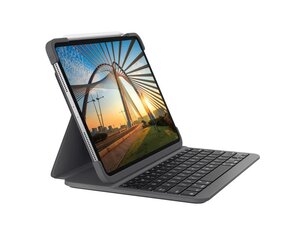
Das Slim Folio Pro ist ein Tastatur-Case von Logitech, das iPad Pro-Nutzern ein Tippgefühl wie bei einem Laptop bieten soll. Es bietet drei verschiedene Nutzungsmodi (Tippen, Notizen/Zeichnen und Lesen) und ist für die Arbeit mit dem Apple Pencil (2. Generation) konzipiert. Das Case zeichnet sich durch langlebige Materialien und einen verstärkten inneren Rahmen für den täglichen Gebrauch aus. Bei Design und Komponentenauswahl legt Logitech Wert auf Nachhaltigkeit. Das Slim Folio Pro wird am iPad befestigt und bietet eine geschützte, integrierte Tastaturlösung für produktives Arbeiten unterwegs.
Identifizierung
Die Logitech SLIM FOLIO PRO für iPad Pro 12,9" (3. Generation) lässt sich anhand ihrer Modellnummer (M/N YR0070) identifizieren. Das Modell-Etikett befindet sich im Inneren des Case. Modell-/SKU-Etiketten befinden sich auf der Produktverpackung und in Produktlistings. Die Seriennummer (S/N) des Geräts ist in der Nähe auf demselben Etikett zu finden.
Spezifikationen
- Bauform: Tastatur-Case (Folio) mit integrierter Tastatur
- Kompatibilität: iPad Pro 12,9" (3. Generation); wird auch als kompatibel mit ausgewählten 11"- und 12,9"-iPad Pro-Generationen verkauft (siehe Logitech-Produktlisting)
- Modell / SKU: 920-009713 (12,9"-Version); 920-009712 (alternative SKU/11"-Version)
- Konnektivität: Drahtlose Bluetooth-Tastatur (drahtlose Verbindung auf dem Tisch; Produkt als iPad-Tastatur-Case kategorisiert)
- Tastenschaltertyp: Low-Profile-Scherenmechanik; genauer Schalterhersteller/-modell von Logitech nicht bekannt gegeben
- Tastaturlayout: Englisch (US) QWERTY-Varianten erhältlich
- Apple Pencil-Unterstützung: Entwickelt für Apple Pencil (2. Generation) – unterstützt das Aufbewahren/Platzieren des Stifts im Notiz-/Zeichenmodus
- Materialien: Langlebiges Äußeres mit verstärktem inneren Rahmen; Logitech weist auf nachhaltige Designpraktiken bei Komponenten und Materialien hin
- Nutzungsmodi: Drei Modi: Tippen (angedockte Tastatur), Notizen/Zeichnen (Bildschirm flach für Apple Pencil), Lesen (Tastatur zurückgeklappt und aufgestellt)
- Stromversorgung: Integrierte interne Stromquelle (wiederaufladbar) – genaue Akkukapazität/Spezifikationen sind nicht auf der Produktseite veröffentlicht
Fehlerdiagnose
Häufige reparaturrelevante Fehler sind nicht reagierende Tasten (oft durch einen leeren Akku oder Probleme bei der Bluetooth-Kopplung verursacht), physischer Verschleiß am Scharnier oder an den Nähten des Folio sowie klemmende oder beschädigte Tasten. Zur Diagnose: Akkustand/Ladevorgang prüfen, Bluetooth-Kopplung neu durchführen, die Nähte des Folio und die Tastaturmembran auf physische Schäden untersuchen und die Reaktion einzelner Tasten mit einem anderen gekoppelten Gerät testen.
Für weitere Hilfe bei der Fehlerdiagnose besuche den Logitech-Support: https://support.logi.com für Produktunterstützung und Kontaktoptionen.
Zusätzliche Informationen
Garantieinformationen
Es gilt eine eingeschränkte Hardwaregarantie (Dauer je nach Region unterschiedlich). Überprüfe die Garantiebedingungen von Logitech für regionalspezifische Details.

