Beliebte Fragen im Forum
Eine Frage stellenEs gibt noch keine Fragen. Stelle du die erste!
Hintergrund
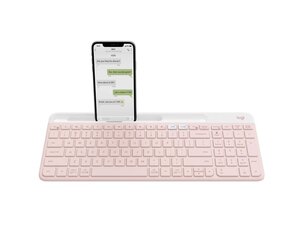
Die Slim Multi-Device Wireless Keyboard K580 ist eine flache, vollwertige Bluetooth-Tastatur, die für produktives Arbeiten an mehreren Geräten entwickelt wurde. Sie bietet die Logitech Easy-Switch-Technologie für ein nahtloses Koppeln mit bis zu drei Geräten und ein flaches, minimalistisches Profil für moderne Arbeitsplätze. Das Gehäuse besteht aus langlebigen Materialien und recyceltem Kunststoff, um Langlebigkeit und Nachhaltigkeit zu vereinen. Zu den Hauptmerkmalen gehören Bluetooth-Konnektivität für mehrere Geräte, ein Ziffernblock und eine lange Akkulaufzeit.
Identifizierung
Die Logitech Slim Multi-Device Wireless Keyboard K580 umfasst die Tastatur (M/N YR0074) und einen USB-Empfänger (M/N C-U0007). Die Modellbezeichnungen befinden sich an folgenden Stellen: Tastatur – auf dem Produktetikett an der Unterseite; USB-Empfänger – aufgedruckt auf der flachen Vorderseite oder der Seite des Empfängergehäuses in der Nähe des USB-Steckers. Jede Komponente besitzt ihre eigene Modellbezeichnung (M/N) und Seriennummer (S/N).
Spezifikationen
- Formfaktor: Vollformat (100 %), flach
- Layout: Standard-QWERTY mit Ziffernblock
- Tastenschaltertyp: Flache Scherenmechanik (Membran) – Hersteller von Logitech nicht spezifiziert
- Konnektivität: Bluetooth für mehrere Geräte (Easy-Switch für bis zu 3 Geräte)
- Stromversorgung: 2 × AAA-Batterien (vom Nutzer austauschbar)
- Akkulaufzeit: Bis zu 24 Monate (typisch, je nach Nutzung)
- Materialien: Strapazierfähige Kunststoffe mit recyceltem Kunststoffanteil; Metall-/Halterungskomponenten in der internen Struktur
- Modell / SKU(s): Produkt-ID: k580-multi-device-wireless-keyboard; SKUs: 920-011477 (Rose), 920-011479 (Graphite)
- Abmessungen: Flache Desktop-Tastatur (Hersteller veröffentlicht keine genauen Abmessungen auf der bereitgestellten Seite)
- Enthaltene Komponenten: Tastatureinheit; vom Nutzer austauschbare Batterien (in einigen Regionen nicht vorinstalliert) – kein externer USB-Empfänger aufgeführt (nur Bluetooth)
Fehlerdiagnose
Häufige Fehler sind nicht reagierende oder klemmende Tasten (oft durch Schmutz oder verschüttete Flüssigkeiten verursacht) – zur Diagnose die Tastenkappen abnehmen und die Membran und Scherenmechanik prüfen/reinigen. Verbindungsprobleme entstehen meist durch leere Batterien oder Kopplungsfehler – Batterien prüfen/ersetzen, erneut via Bluetooth koppeln und mit einem anderen Host-Gerät testen. Bei vermuteten Schäden an der Platine oder Membran nach einem Stoß oder Kontakt mit Flüssigkeit, nach dem Öffnen des Gehäuses die interne Membran/Platine inspizieren; ein Austausch erfordert normalerweise eine Demontage und eine Reparatur oder den Austausch auf Platinenebene.
Für weitere Hilfe bei der Fehlerdiagnose besuche: Besuche https://support.logi.com für Produktsupport, Fehlerdiagnose und Kontaktmöglichkeiten.
Weitere Informationen
Garantieinformationen
Eingeschränkte Herstellergarantie (variiert je nach Region); siehe Garantieinformationen von Logitech für spezifische Abdeckung und Dauer (normalerweise 1 Jahr).

