Beliebte Fragen im Forum
Eine Frage stellenEs gibt noch keine Fragen. Stelle du die erste!
Hintergrund
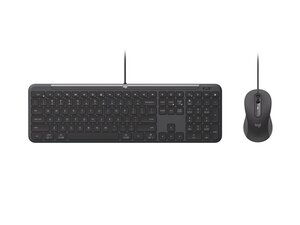
Das Logitech Wireless Combo MK620 ist ein kompaktes, drahtloses Tastatur-Maus-Set, das für die tägliche Produktivität am Schreibtisch konzipiert wurde. Das Set besteht aus langlebigem ABS-Kunststoff und flachen Tasten, die für den häufigen Gebrauch ausgelegt sind. Zu den Hauptmerkmalen gehören eine flache Tastatur mit Scherenschalter-Mechanik, eine kompakte optische Maus und eine 2,4-GHz-Konnektivität über einen Logitech Unifying-Empfänger. Das Design legt Wert auf eine lange Akkulaufzeit und einen kleinen Nano-Empfänger für eine unauffällige Verbindung.
Identifizierung
Das Logitech WIRELESS COMBO MK620 umfasst die Tastatur (M/N Y-R0012), die Maus (M/N M-R0009) und den USB-Empfänger (M/N C-U0008). Die Modellbezeichnungen befinden sich an folgenden Stellen – Tastatur: auf dem Produktetikett auf der Unterseite; Maus: auf dem Produktetikett auf der Unterseite; USB-Empfänger: aufgedruckt auf der flachen Seite oder der Gehäuseseite des Empfängers in der Nähe des USB-Anschlusses. Jede Komponente besitzt ihre eigene Modellnummer (M/N) und Seriennummer (S/N).
Spezifikationen
- Komponenten: Drahtlose Tastatur und kompakte drahtlose optische Maus; enthält einen Logitech Unifying USB-Empfänger (Nano)
- Formfaktor: Flache Tastatur in Standardgröße mit integriertem Ziffernblock; kompakte Maus für Rechts- und Linkshänder
- Schaltertyp: Scherenschalter-Membrantastenmechanik (flach); der Schalterhersteller ist auf der Support-Seite nicht angegeben
- Konnektivität: 2,4-GHz-Funkverbindung über Logitech Unifying-Empfänger (USB-Nano-Dongle), Kopplung mit einem einzelnen Gerät; Bluetooth wird auf der Support-Seite nicht aufgeführt
- Stromversorgung (Tastatur): Vom Benutzer austauschbare Batterien (vom Logitech-Support als vom Benutzer austauschbar angegeben; der genaue Zelltyp ist auf der Support-Seite nicht gelistet)
- Stromversorgung (Maus): Vom Benutzer austauschbare Batterie in der Maus (Typ auf der Support-Seite nicht spezifiziert)
- Sensor (Maus): Optischer Tracking-Sensor (das genaue Sensormodell ist auf der Support-Seite nicht angegeben)
- Empfänger: Logitech Unifying USB-Empfänger (ermöglicht den Betrieb mehrerer kompatibler Geräte an einem Empfänger); die genaue Teilenummer des Empfängers ist auf der Support-Seite nicht gelistet
- Materialien: Langlebiges ABS-Kunststoffgehäuse für Tastatur und Maus; flache Kunststofftasten
- Kompatibilität: Laut Logitech-Support werden Windows und macOS unterstützt; die Verwaltungssoftware wurde auf Logi Options+ umgestellt (ältere Tools wie die Unifying Software könnten veraltet sein)
Fehlerdiagnose
Häufige Probleme sind leere oder verbrauchte Batterien, Probleme bei der Kopplung des Empfängers sowie klemmende oder nicht reagierende Tasten. Zur Diagnose: Lege frische Batterien ein, prüfe, ob der Unifying-Empfänger eingesteckt ist, kopple die Geräte mit der Logitech-Software neu und entferne Tasten oder Batterien, um sie auf Verschmutzungen oder Korrosion zu untersuchen.
Für weitere Hilfe bei der Fehlerdiagnose besuche: support.logi.com für Produktsupport, Software (Logi Options+) und Kontaktkanäle.
Zusätzliche Informationen
Garantieinformationen
Die eingeschränkte Herstellergarantie variiert je nach Region; prüfe die Garantieinformationen von Logitech auf der Support-Website.

