Beliebte Fragen im Forum
Eine Frage stellenEs gibt noch keine Fragen. Stelle du die erste!
Hintergrund
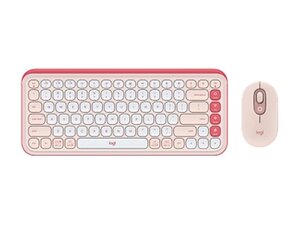
Das Wireless Wave Combo MK550 ist ein ergonomisches Full-Size-Tastatur- und Maus-Set mit geformter kabelloser Maus, das für komfortables Arbeiten den ganzen Tag über entwickelt wurde. Die Tastatur zeichnet sich durch das wellenförmige Tastenlayout von Logitech und eine integrierte gepolsterte Handballenauflage aus, die für verbesserte Ergonomie aus robustem ABS-Kunststoff und weichen Materialien gefertigt ist. Das Set nutzt einen kompakten USB-Empfänger für eine drahtlose 2,4-GHz-Verbindung und setzt auf eine lange Akkulaufzeit sowie einfache Plug-and-Play-Nutzung. Zu den Hauptmerkmalen gehören die geformte Maus, die konturierten Tastenkappen und eine robuste, flüssigkeitsabweisende Konstruktion.
Identifizierung
Das Logitech WIRELESS WAVE COMBO MK550 umfasst die Tastatur (M/N Y-R0053), die Maus (M/N MR0108) und den USB-Empfänger (M/N C-U0007). Die Modellbezeichnungen befinden sich an folgenden Stellen: Tastatur: auf dem Produktaufkleber an der Unterseite; Maus: auf dem Produktaufkleber an der Unterseite; USB-Empfänger: aufgedruckt auf der flachen Seite oder der Seite des Empfängergehäuses in der Nähe des USB-Steckers. Jede Komponente besitzt eine eigene Modellnummer (M/N) und Seriennummer (S/N).
Spezifikationen
- Modell: Wireless Wave Combo MK550 (Set aus Tastatur + Maus)
- Formfaktor: Ergonomische, wellenförmige Full-Size-Tastatur mit integrierter gepolsterter Handballenauflage; geformte Maus für Rechtshänder
- Schaltertyp: Membran-Tastenschalter (Rubberdome) – Hersteller: Logitech (Rubberdome-Membran-Design)
- Konnektivität: Drahtlose 2,4-GHz-Verbindung über kompakten USB-Nano-Empfänger (Plug-and-Play)
- Empfänger: Kompakter USB-Nano-Empfänger enthalten (Hersteller/Teilenummer auf dem Empfänger oder der Verpackung aufgedruckt)
- Stromversorgung: Vom Benutzer austauschbare Alkalibatterien für Tastatur und Maus (genaue Anzahl und Typ der Batteriezellen auf dem Produktaufkleber prüfen)
- Maus-Sensor: Optischer Tracking-Sensor (von Logitech entwickelt) für den allgemeinen Desktop-Gebrauch
- Materialien: Gehäuse aus robustem ABS-Kunststoff mit weicher Handballenauflagenpolsterung und flüssigkeitsabweisendem Tastenfeld
- Hintergrundbeleuchtung: Keine (Tasten ohne Hintergrundbeleuchtung)
- Kompatibilität: Kompatibel mit Windows und macOS für grundlegende Tastatur-/Mausfunktionen; volle Funktionsunterstützung über Logitech-Software, sofern verfügbar
- Enthaltene Komponenten: Drahtlose Wave-Tastatur, geformte kabellose Maus, USB-Nano-Empfänger, Benutzerdokumentation
Fehlerdiagnose
Zu den häufigen Fehlern gehören der Verlust der drahtlosen Verbindungen, leere/schwache Batterien und nicht reagierende Tasten aufgrund von Schmutz oder eingedrungener Flüssigkeit. Zur Diagnose die Batterien gegen frische austauschen, den USB-Empfänger neu einsetzen oder austauschen, das Gerät an einem anderen PC testen und die Unterseite der Tastatur auf lose Stecker oder sichtbare Schäden untersuchen; verwende ein Multimeter, um die Batteriespannung und die Durchgängigkeit der Stromschienen bei reparierbaren Platinen zu prüfen.
Für weitere Hilfe bei der Fehlerdiagnose besuche: https://support.logi.com und suche nach MK550 für Hilfeartikel und Kontaktmöglichkeiten.
Weitere Informationen
Garantieinformationen
Beachte die auf der Support-Website verlinkten Logitech-Garantieinformationen; die Garantiebedingungen variieren je nach Region und Händler.

