Beliebte Fragen im Forum
Eine Frage stellenEs gibt noch keine Fragen. Stelle du die erste!
Hintergrund
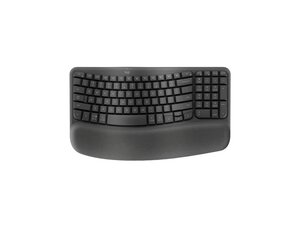
Die Wave Keys ist eine ergonomische, drahtlose Tastatur von Logitech, die sich durch ein wellenförmiges Tastenlayout und eine integrierte, gepolsterte Handballenauflage auszeichnet, um eine natürlichere Tipphaltung zu fördern. Sie wurde für ganztägigen Komfort entwickelt, von Ergonomie-Experten anerkannt und zielt darauf ab, den Druck auf die Handgelenke zu verringern und gleichzeitig ein kompaktes Design beizubehalten. Das Gehäuse besteht aus recyceltem Kunststoff, was die Nachhaltigkeitsinitiativen von Logitech widerspiegelt. Zu den Hauptmerkmalen gehören ein ergonomisch geformtes Tastenlayout, eine gepolsterte Handballenauflage und der drahtlose Betrieb.
Identifizierung
Die Logitech Wave Keys kann anhand der Modellnummer (M/N CU0021) identifiziert werden. Das Modellschild befindet sich an der Unterseite (920-011898, 920-012275, 920-012276). Zudem ist sie an ihrem markanten wellenförmigen Tastenlayout mit der gepolsterten Handballenauflage auf der Vorderseite zu erkennen. Dieses Schild listet die Modellnummer (M/N), die Teilenummer (P/N) und die Seriennummer (S/N) auf.
Spezifikationen
- Formfaktor: Ergonomische, wellenförmige Tastatur in voller Größe mit integrierter, gepolsterter Handballenauflage
- Modellnummern / SKUs: 920-011898 (Graphite), 920-012275 (Off-white), 920-012276 (Rose)
- Farben: Graphite, Off-white, Rose
- Materialien: Gehäuse aus recyceltem Kunststoff (laut Herstellerangaben)
- Konnektivität: Drahtlos (auf der Produktseite als ergonomisch und drahtlos aufgeführt; genaue Kopplungsmethoden sind auf der Produktseite nicht spezifiziert)
- Switches: Proprietäre Low-Profile-Switches von Logitech; Hersteller/Modell sind auf der Produktseite nicht genannt
- Stromversorgung: Drahtlose Stromversorgung (Batterietyp und Laufzeit sind auf den Produkt-/Support-Seiten von Logitech nicht spezifiziert)
- Produkt-ID: wave-keys-ergonomic-wireless
- Kategorie: Tastaturen
- Ersatzteile / Support: Die Support-Seite von Logitech listet keine Ersatzteile oder Downloads für dieses Produkt
Fehlerdiagnose
Häufige reparaturrelevante Fehler umfassen Probleme mit der Konnektivität oder Kopplung, nicht reagierende oder nur zeitweise funktionierende Tasten (oft verursacht durch Schmutz oder lose interne Stecker) sowie Probleme mit der Stromversorgung oder Batterie. Diagnostiziere das Problem, indem du die Batterie oder Stromversorgung prüfst, die Tastatur erneut koppelst, die Tastenkappen abnimmst, um sie auf Ablagerungen oder klemmende Switches zu untersuchen, und das Gehäuse öffnest, um zu überprüfen, ob Flachbandkabel und Anschlüsse auf der Platine richtig sitzen.
Für weitere Hilfe bei der Fehlerdiagnose besuche: https://support.logi.com für Produktsupport, Kontaktmöglichkeiten und allgemeine Fehlerdiagnose.
Weitere Informationen
Garantieinformationen
Informationen zur Garantieabdeckung und Anweisungen für Garantieansprüche findest du auf der Seite zur eingeschränkten regionalen Herstellergarantie von Logitech; die genaue Garantiedauer variiert je nach Region.

