Zum Hauptinhalt wechseln
Gemeinsam reparieren - Jetzt registrieren

Canon EOS 30 Remote Control Socket Replacement

Was du brauchst

  1. Canon EOS 30 Remote Control Socket Replacement, Front Panel: Schritt 1, Bild 1 von 1
    • Remove the two 4.8 mm black screws above the lens on the front of the camera.

    Frag FixBot

    Kommentar hinzufügen

  2. Canon EOS 30 Remote Control Socket Replacement: Schritt 2, Bild 1 von 1
    • Remove the 4.3 mm black screw under the lens ring, and the 4.8 mm black screw under the camera.

    Frag FixBot

    Kommentar hinzufügen

  3. Canon EOS 30 Remote Control Socket Replacement: Schritt 3, Bild 1 von 1
    • Remove the 4.8 mm black screw on the left side of the camera.

    Frag FixBot

    Kommentar hinzufügen

  4. Canon EOS 30 Remote Control Socket Replacement: Schritt 4, Bild 1 von 1
    • Remove the front panel by lifting it away from the camera's body.

    Frag FixBot

    Kommentar hinzufügen

  5. Canon EOS 30 Remote Control Socket Replacement, Bottom Panel: Schritt 5, Bild 1 von 1
    • Remove seven 4.25 mm black screws on the bottom panel.

    Frag FixBot

    Kommentar hinzufügen

  6. Canon EOS 30 Remote Control Socket Replacement: Schritt 6, Bild 1 von 1
    • Remove the bottom panel.

    Frag FixBot

    Kommentar hinzufügen

  7. Canon EOS 30 Remote Control Socket Replacement, Side Panel With Remote Control Socket: Schritt 7, Bild 1 von 1
    • Remove two 6.5 mm black screws from the panel.

    Frag FixBot

    Kommentar hinzufügen

  8. Canon EOS 30 Remote Control Socket Replacement: Schritt 8, Bild 1 von 1
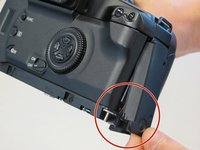
    • Remove the plastic remote control socket cap by pulling it straight out.

    Frag FixBot

    Kommentar hinzufügen

  9. Canon EOS 30 Remote Control Socket Replacement: Schritt 9, Bild 1 von 2 Canon EOS 30 Remote Control Socket Replacement: Schritt 9, Bild 2 von 2
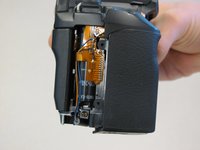
    • Slide the panel toward the bottom of the camera to remove.

    Frag FixBot

    Kommentar hinzufügen

  10. Canon EOS 30 Remote Control Socket Replacement: Schritt 10, Bild 1 von 1
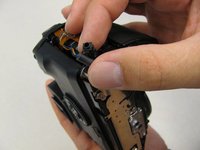
    • Remove the single 4.8 silver screw from the control socket.

    Frag FixBot

    Kommentar hinzufügen

  11. Canon EOS 30 Remote Control Socket Replacement: Schritt 11, Bild 1 von 2 Canon EOS 30 Remote Control Socket Replacement: Schritt 11, Bild 2 von 2
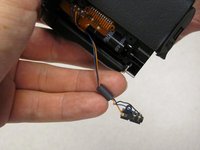
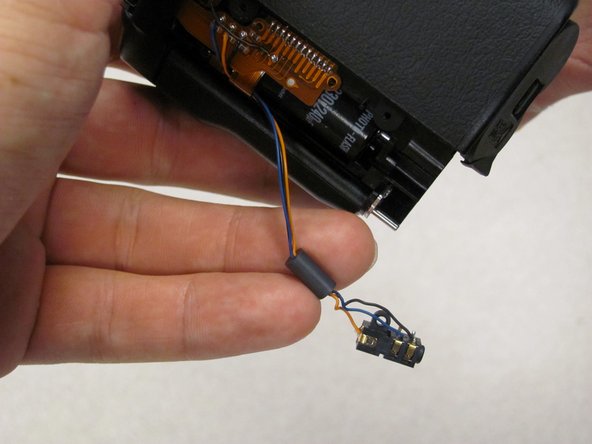
    • The control socket is now secure by three wires.

    • Desolder connections to replace the remote control socket.

    Frag FixBot

    Kommentar hinzufügen

  12. Canon EOS 30 Remote Control Socket Replacement, Remote Control Socket: Schritt 12, Bild 1 von 1
    • Remove one 4.8 mm silver screw securing Remote Control Socket to camera.

    Frag FixBot

    Kommentar hinzufügen

  13. Canon EOS 30 Remote Control Socket Replacement: Schritt 13, Bild 1 von 2 Canon EOS 30 Remote Control Socket Replacement: Schritt 13, Bild 2 von 2
    • Remote Control Socket is now secured by 3 wires.

    • Desolder connections to replace Remote Control Socket.

    Frag FixBot

    Kommentar hinzufügen

Abschluss

To reassemble your device, follow these instructions in reverse order.

Rückgängig: Ich habe diese Anleitung nicht absolviert.

2 weitere Personen haben diese Anleitung absolviert.

Antonia

Mitglied seit: 04/17/11

124 Reputation

2 Anleitungen geschrieben

Team

Cal Poly, Team 8-8, Regan Spring 2011 Mitglied von Cal Poly, Team 8-8, Regan Spring 2011

CPSU-REGAN-S11S8G8

5 Mitglieder

22 Anleitungen geschrieben

0 Kommentare zur Anleitung

Kommentar hinzufügen

Seitenaufrufe:

Letzte 24 Stunden: 2

Letzte 7 Tage: 14

Letzte 30 Tage: 59

Insgesamt: 3,391