Zum Hauptinhalt wechseln
Gemeinsam reparieren - Jetzt registrieren

How to Apply New Base Battery Adhesive in Your Google Pixel Fold

Was du brauchst

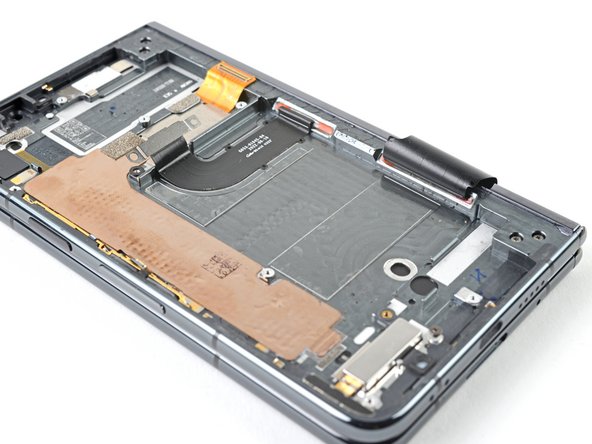
    1. How to Apply New Base Battery Adhesive in Your Google Pixel Fold, Remove the old adhesive: Schritt 1, Bild 1 von 3 How to Apply New Base Battery Adhesive in Your Google Pixel Fold, Remove the old adhesive: Schritt 1, Bild 2 von 3 How to Apply New Base Battery Adhesive in Your Google Pixel Fold, Remove the old adhesive: Schritt 1, Bild 3 von 3
      In diesem Schritt verwendetes Werkzeug:
      Microfiber Cleaning Cloths
      $3.99
      • Apply a few drops of highly-concentrated isopropyl alcohol (over 90%) to the old adhesive.

      • Use the flat end of a spudger and tweezers to remove the remaining adhesive from the frame.

      • Wipe any remaining isopropyl alcohol residue with a lint-free or microfiber cloth.

      Frag FixBot

      Kommentar hinzufügen

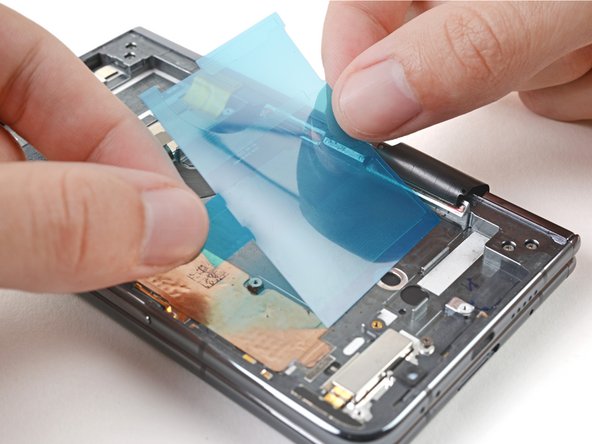
    2. How to Apply New Base Battery Adhesive in Your Google Pixel Fold, Align the adhesive: Schritt 2, Bild 1 von 3 How to Apply New Base Battery Adhesive in Your Google Pixel Fold, Align the adhesive: Schritt 2, Bild 2 von 3 How to Apply New Base Battery Adhesive in Your Google Pixel Fold, Align the adhesive: Schritt 2, Bild 3 von 3
      • Place the new adhesive strips over the frame to check their proper orientation.

      • Although there are multiple strips, they come attached to a single blue liner.

      • The clear liner should face the frame.

      • Use the white lines on the frame to align the adhesive strip bottom left corners.

      Frag FixBot

      Kommentar hinzufügen

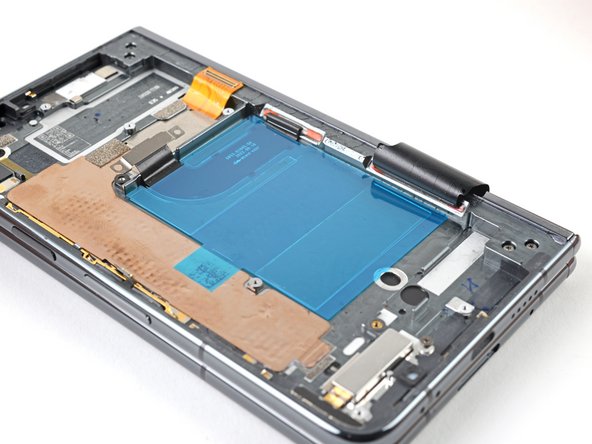
    3. How to Apply New Base Battery Adhesive in Your Google Pixel Fold, Apply the adhesive: Schritt 3, Bild 1 von 3 How to Apply New Base Battery Adhesive in Your Google Pixel Fold, Apply the adhesive: Schritt 3, Bild 2 von 3 How to Apply New Base Battery Adhesive in Your Google Pixel Fold, Apply the adhesive: Schritt 3, Bild 3 von 3
      • Be careful during this step, as it's easy to stick the adhesive in the wrong spot. Take your time and work slowly.

      • Peel off the new adhesive strip from its clear liner and apply the sticky side to the frame.

      Frag FixBot

      Kommentar hinzufügen

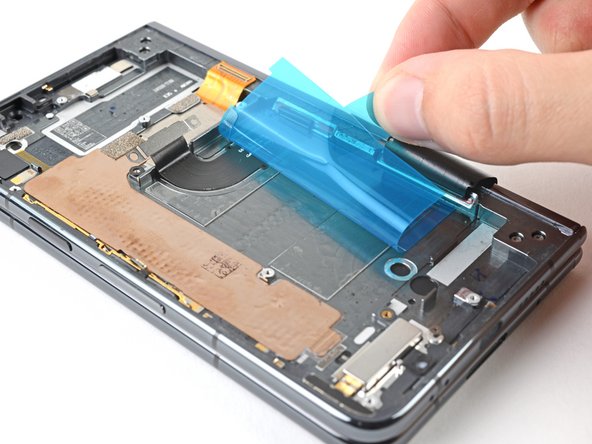
    4. How to Apply New Base Battery Adhesive in Your Google Pixel Fold: Schritt 4, Bild 1 von 3 How to Apply New Base Battery Adhesive in Your Google Pixel Fold: Schritt 4, Bild 2 von 3 How to Apply New Base Battery Adhesive in Your Google Pixel Fold: Schritt 4, Bild 3 von 3
      • Use a spudger, or your fingers, to press down the adhesive and adhere it to the frame.

      • Grip the pull tab and peel off the blue liner to expose the top adhesive.

      Frag FixBot

      Kommentar hinzufügen

    5. How to Apply New Base Battery Adhesive in Your Google Pixel Fold, Secure the battery: Schritt 5, Bild 1 von 3 How to Apply New Base Battery Adhesive in Your Google Pixel Fold, Secure the battery: Schritt 5, Bild 2 von 3 How to Apply New Base Battery Adhesive in Your Google Pixel Fold, Secure the battery: Schritt 5, Bild 3 von 3
      • Depending on your repair, your logic board might be removed. Be careful when aligning the battery to ensure the cable reaches the logic board properly.

      • If your battery pull tabs are still intact, you can thread them under the battery. Use tape with light adhesive to stick them in their original position.

      • If you have your logic board installed, reconnect the battery connector temporarily to ensure the battery gets aligned properly.

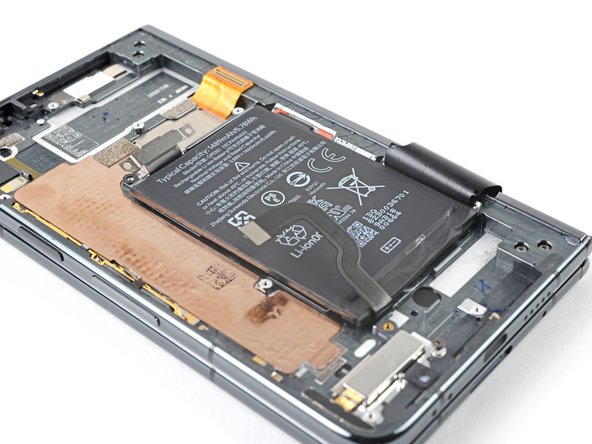
      • Place the battery in its recess, making sure to align it as close to the top edge of the recess lip as possible.

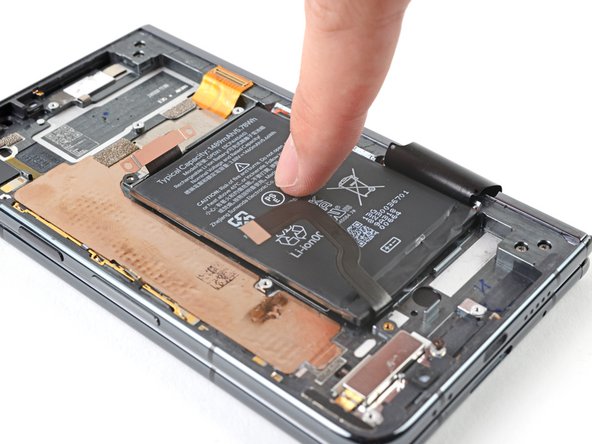
      • Press down on the battery to adhere it to the frame.

      • Make sure the battery is disconnected before continuing your repair.

      Frag FixBot

      Kommentar hinzufügen

Abschluss

Repair didn’t go as planned? Try some basic troubleshooting, or ask our Google Pixel Fold Answers Community for help.

Rückgängig: Ich habe diese Anleitung nicht absolviert.

Alex Diaz-Kokaisl

Mitglied seit: 01/16/22

247.024 Reputation

1.203 Anleitungen geschrieben

Team

iFixit Mitglied von iFixit

Staff

123 Mitglieder

58.260 Anleitungen geschrieben

0 Kommentare zur Anleitung

Kommentar hinzufügen

Seitenaufrufe:

Letzte 24 Stunden: 0

Letzte 7 Tage: 9

Letzte 30 Tage: 45

Insgesamt: 527