Zum Hauptinhalt wechseln
Gemeinsam reparieren - Jetzt registrieren

How to Fix Logitech G403 Double Click Issue

Was du brauchst

  1. How to Fix Logitech G403 Double Click Issue, How to Fix Logitech G403 Double Click Issue: Schritt 1, Bild 1 von 1
    • Use a prying tool or your hand to take out both sides of the mouse feet.

    Frag FixBot
  2. How to Fix Logitech G403 Double Click Issue: Schritt 2, Bild 1 von 1
    • Use a precision screwdriver to remove four screws from the mouse.

    Frag FixBot
  3. How to Fix Logitech G403 Double Click Issue: Schritt 3, Bild 1 von 2 How to Fix Logitech G403 Double Click Issue: Schritt 3, Bild 2 von 2
    • Slowly open the mouse, and take care not to tear the ribbon cable.

    • Detach the cable connector.

    Frag FixBot
  4. How to Fix Logitech G403 Double Click Issue: Schritt 4, Bild 1 von 2 How to Fix Logitech G403 Double Click Issue: Schritt 4, Bild 2 von 2
    • Remove seven screws from the upper cover.

    Frag FixBot
  5. How to Fix Logitech G403 Double Click Issue: Schritt 5, Bild 1 von 2 How to Fix Logitech G403 Double Click Issue: Schritt 5, Bild 2 von 2
    • Remove four screws from the mouse.

    • Remove the mouse click cover.

    Frag FixBot
  6. How to Fix Logitech G403 Double Click Issue: Schritt 6, Bild 1 von 2 How to Fix Logitech G403 Double Click Issue: Schritt 6, Bild 2 von 2
    • Remove the five screws attached to the mouse click switches.

    Frag FixBot
  7. How to Fix Logitech G403 Double Click Issue: Schritt 7, Bild 1 von 2 How to Fix Logitech G403 Double Click Issue: Schritt 7, Bild 2 von 2
    • Open the mouse switch using a prying tool or your hands.

    • Be careful not to lose the white plastic part from the mouse switch.

    Frag FixBot
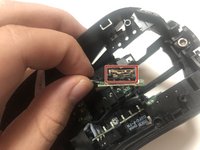
  8. How to Fix Logitech G403 Double Click Issue: Schritt 8, Bild 1 von 2 How to Fix Logitech G403 Double Click Issue: Schritt 8, Bild 2 von 2
    • Find the place where more tension is needed.

    • Use a prying tool or your hand to give more tension to the copper piece, making sure the copper is curved.

    Frag FixBot
Abschluss

To reassemble your device, follow these instructions in reverse order.

10 weitere Personen haben diese Anleitung absolviert.

Team

York University, Team S1-G25, Allen Summer 2020 Mitglied von York University, Team S1-G25, Allen Summer 2020

YORK-ALLEN-SU20S1G25

1 Mitglied

2 Anleitungen geschrieben

10 Kommentare zur Anleitung

step 8 made no sense and had to google it

rel - Antwort Teilen

did you find a video about that? if you could send it pls or if it was some place where talk more about it

Lian López - Antwort Teilen

Worked!!! I had this problem for years, even stoped playing valorant bacause of that. Thanks

VampireKing - Antwort Teilen

I could not open these screws :( What are the screwdriver size to open these?

Siim - Antwort Teilen

Kommentar hinzufügen

Seitenaufrufe:

Letzte 24 Stunden: 2

Letzte 7 Tage: 19

Letzte 30 Tage: 170

Insgesamt: 36,495