Einleitung
The purpose of this guide is to demonstrate how to replace the battery of your Lenovo Ideapad 350-15IAP. This replacement guide is very simple and requires very little technical knowledge to complete. In summary, you will be using a Phillip’s head screwdriver to remove the case of the laptop. The battery will be immediately exposed and can be removed by simply removing four screws.
Was du brauchst
-
-
Using a Phillips #0 screwdriver, unscrew all thirteen 6.5 mm screws from the back case.
-
-
-
Pull the CD drive outwards with an opening tool until it pops out as shown. It is possible you have to apply a substantial amount of force so watch your fingers while doing so.
-
Remove the CD drive.
-
-
-
-
Lift up the cover using the opening tool on different spots along the side of the laptop.
-
-
-
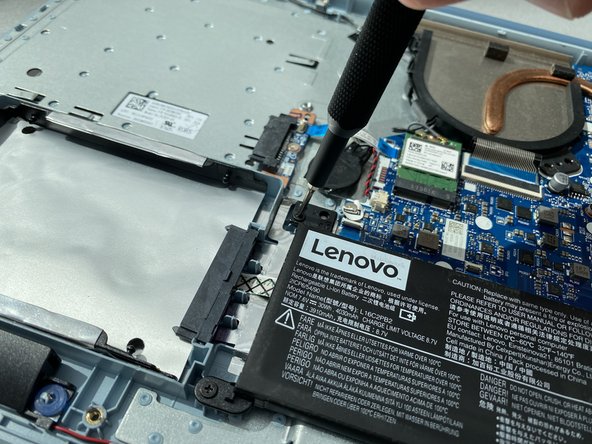
Using a Phillips #0 screwdriver to unscrew the four 5.5 mm screws securing the battery.
-
-
-
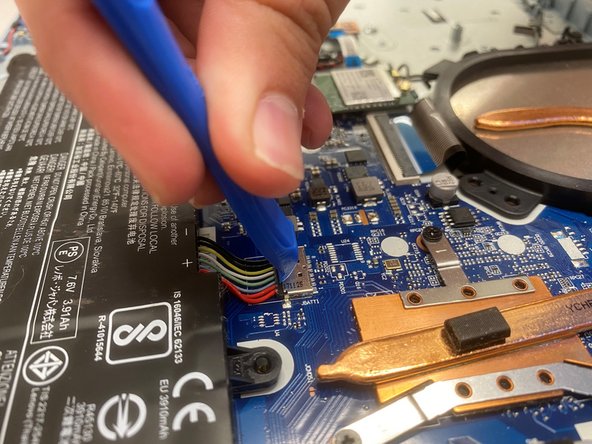
Disconnect the battery cable from its motherboard socket by gently pulling it towards the battery.
-




To reassemble your device, follow these instructions in reverse order.
For optimal performance, after completing this guide, calibrate your newly installed battery.
Take your e-waste to an R2 or e-Stewards certified recycler.
Repair didn’t go as planned? Try some basic troubleshooting, or ask our Answers community for help.
To reassemble your device, follow these instructions in reverse order.
For optimal performance, after completing this guide, calibrate your newly installed battery.
Take your e-waste to an R2 or e-Stewards certified recycler.
Repair didn’t go as planned? Try some basic troubleshooting, or ask our Answers community for help.
Rückgängig: Ich habe diese Anleitung nicht absolviert.
Ein:e weitere:r Nutzer:in hat diese Anleitung absolviert.



Team

Embry-Riddle Aeronautical University, Team S17-G11, Lamothe Spring 2020 Mitglied von Embry-Riddle Aeronautical University, Team S17-G11, Lamothe Spring 2020
ERAU-LAMOTHE-S20S17G11
4 Mitglieder
10 Anleitungen geschrieben
