Zum Hauptinhalt wechseln
Gemeinsam reparieren - Jetzt registrieren

Lenovo ThinkPad T480s USB Card Replacement

Was du brauchst

  1. Lenovo ThinkPad T480s USB Card Replacement, Bottom Cover: Schritt 1, Bild 1 von 2 Lenovo ThinkPad T480s USB Card Replacement, Bottom Cover: Schritt 1, Bild 2 von 2
    • Disable the battery, power down the device, and unplug the power adapter from your device before proceeding/beginning the guide.

    • Loosen the six captive screws with a Phillips #1 screwdriver.

  2. Lenovo ThinkPad T480s USB Card Replacement: Schritt 2, Bild 1 von 3 Lenovo ThinkPad T480s USB Card Replacement: Schritt 2, Bild 2 von 3 Lenovo ThinkPad T480s USB Card Replacement: Schritt 2, Bild 3 von 3
    • Remove the bottom cover with an opening tool.

    • Start from the top edge near the hinge and work your way along the edge until all of the clips are unsnapped.

  3. Lenovo ThinkPad T480s USB Card Replacement: Schritt 3, Bild 1 von 2 Lenovo ThinkPad T480s USB Card Replacement: Schritt 3, Bild 2 von 2
    • Lift the bottom cover off.

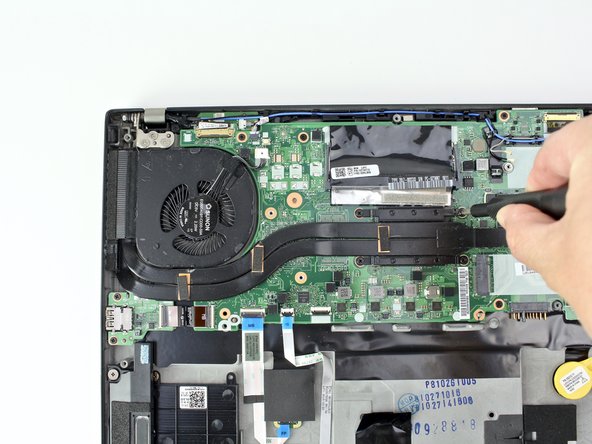
  4. Lenovo ThinkPad T480s USB Card Replacement, Fan Assembly: Schritt 4, Bild 1 von 2 Lenovo ThinkPad T480s USB Card Replacement, Fan Assembly: Schritt 4, Bild 2 von 2
    • Use the spudger to disconnect the fan cable from the motherboard.

  5. Lenovo ThinkPad T480s USB Card Replacement: Schritt 5, Bild 1 von 2 Lenovo ThinkPad T480s USB Card Replacement: Schritt 5, Bild 2 von 2
    • Loosen the four captive screws attaching the fan assembly to the motherboard.

    • Do not attempt to remove the captive screws, as forcing them out may strip or damage them.

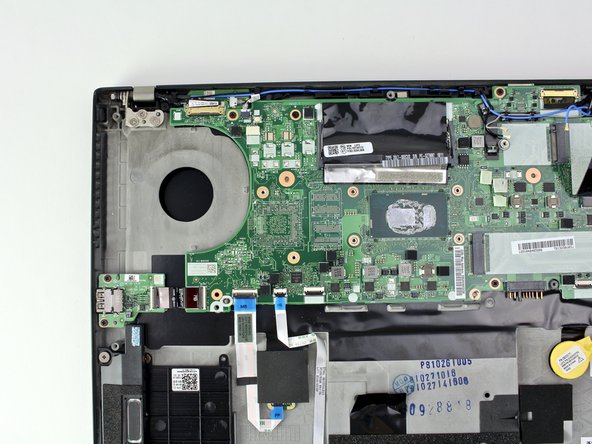
  6. Lenovo ThinkPad T480s USB Card Replacement: Schritt 6, Bild 1 von 3 Lenovo ThinkPad T480s USB Card Replacement: Schritt 6, Bild 2 von 3 Lenovo ThinkPad T480s USB Card Replacement: Schritt 6, Bild 3 von 3
    • Lift the fan assembly from the system and remove it.

    • Follow our thermal paste application guide before you replace the fan assembly and are ready to reassemble your device.

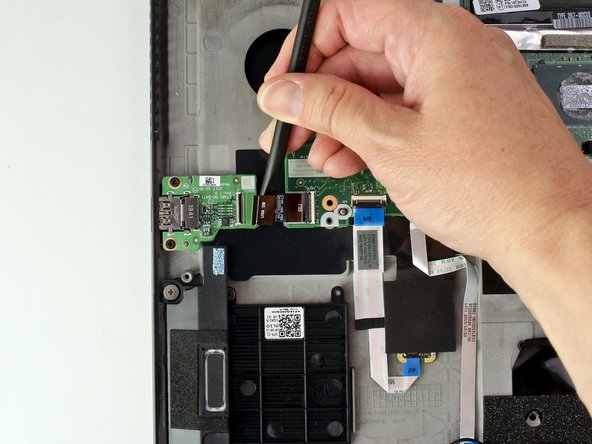
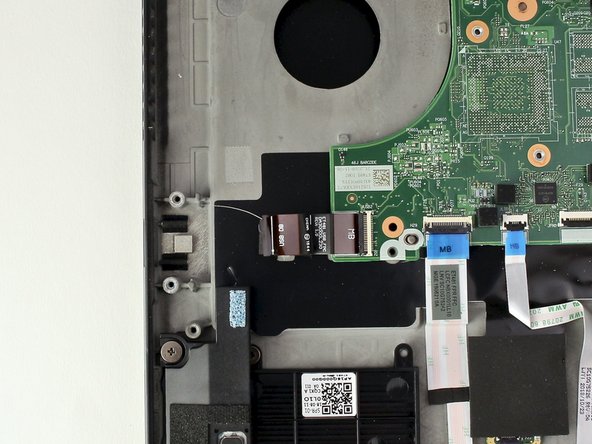
  7. Lenovo ThinkPad T480s USB Card Replacement, USB Card: Schritt 7, Bild 1 von 3 Lenovo ThinkPad T480s USB Card Replacement, USB Card: Schritt 7, Bild 2 von 3 Lenovo ThinkPad T480s USB Card Replacement, USB Card: Schritt 7, Bild 3 von 3
    • Use a spudger to disconnect the cable from the USB card.

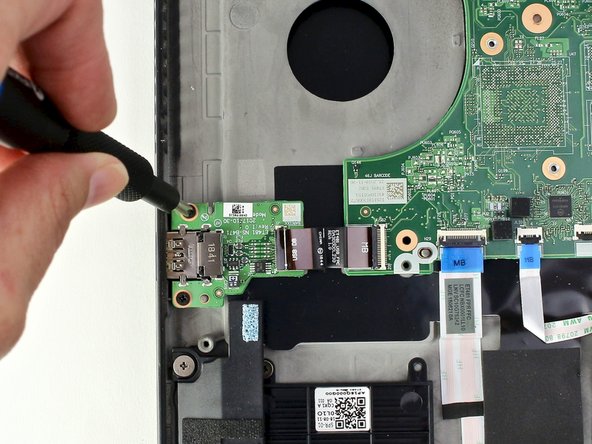
  8. Lenovo ThinkPad T480s USB Card Replacement: Schritt 8, Bild 1 von 2 Lenovo ThinkPad T480s USB Card Replacement: Schritt 8, Bild 2 von 2
    • Use the Phillips #1 screwdriver to remove two 3 mm screws from the USB card.

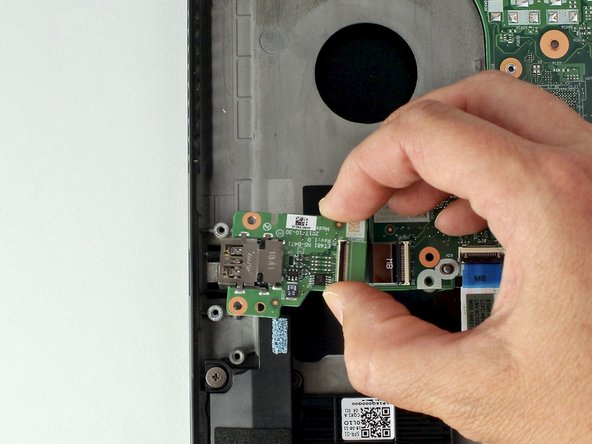
  9. Lenovo ThinkPad T480s USB Card Replacement: Schritt 9, Bild 1 von 3 Lenovo ThinkPad T480s USB Card Replacement: Schritt 9, Bild 2 von 3 Lenovo ThinkPad T480s USB Card Replacement: Schritt 9, Bild 3 von 3
    • With your fingers, lift the USB card from the system.

Abschluss

To reassemble your device, follow these instructions in reverse order.

Take your e-waste to an R2 or e-Stewards certified recycler.

Repair didn’t go as planned? Try some basic troubleshooting, or ask our Answers community for help.

Team

iFixit Mitglied von iFixit

Staff

123 Mitglieder

25.636 Anleitungen geschrieben

0 Kommentare zur Anleitung

Kommentar hinzufügen

Seitenaufrufe:

Letzte 24 Stunden: 0

Letzte 7 Tage: 15

Letzte 30 Tage: 53

Insgesamt: 1,397