Zum Hauptinhalt wechseln
Gemeinsam reparieren - Jetzt registrieren

Samsung Galaxy Watch3 Display Replacement

Aufrufe: 12.006

Statistik anzeigen:

Letzte 24 Stunden:
4
Letzte 7 Tage:
30
Letzte 30 Tage:
167
Insgesamt:
12.006
Kommentare: 8

7 Kommentare zu Schritten, 1 Kommentar zur Anleitung.

Zu den Kommentaren
Abgeschlossen: 3

3 Personen haben diese Anleitung schon erfolgreich absolviert. Du auch?

Favoriten: 0

Diese Anleitung hat noch niemand unter Favoriten gespeichert (und abonniert). Mach du den Anfang!

Zeitaufwand: 20 - 45 Minuten
Schwierigkeitsgrad: Mittel
Empfohlene Anleitung

Diese Anleitung wird von den iFixit-Mitarbeitern als außergewöhnlich gut eingestuft.

Samsung Galaxy Watch3 Display Replacement

Use this guide to replace a cracked or broken screen on your Samsung Galaxy Watch3.

Was du brauchst

Ersatzteile

Werkzeuge

    1. Samsung Galaxy Watch3 Display Replacement, Unfasten the back cover screws: Schritt 1, Bild 1 von 1
      • Before starting repairs, take your watch off the charger and power it down.

      • Use a Tri-point Y00 driver to unfasten the four screws on the back of the watch.

      • Don’t worry about removing the screws, they will stay in place in the back cover.

      Frag FixBot

      Kommentar hinzufügen

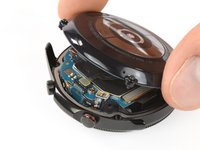
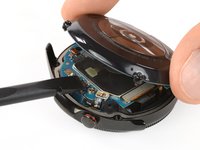
    2. Samsung Galaxy Watch3 Display Replacement, Wedge open the back cover: Schritt 2, Bild 1 von 2 Samsung Galaxy Watch3 Display Replacement, Wedge open the back cover: Schritt 2, Bild 2 von 2
      • Insert an opening tool between the back cover and the metal housing.

      • Twist the opening tool to create a wider gap.

      • Don't fully remove the back cover just yet. The sensor flex cable is still connected to the motherboard.

      Frag FixBot

      Kommentar hinzufügen

    3. Samsung Galaxy Watch3 Display Replacement, Disconnect the sensor flex cable: Schritt 3, Bild 1 von 3 Samsung Galaxy Watch3 Display Replacement, Disconnect the sensor flex cable: Schritt 3, Bild 2 von 3 Samsung Galaxy Watch3 Display Replacement, Disconnect the sensor flex cable: Schritt 3, Bild 3 von 3
      • Lay the watch face down.

      • Carefully lift the back cover up from the edge with the buttons to access the sensor connector.

      • Use the flat end of a spudger to pry up and disconnect the sensor flex cable from the motherboard.

      Frag FixBot

      Kommentar hinzufügen

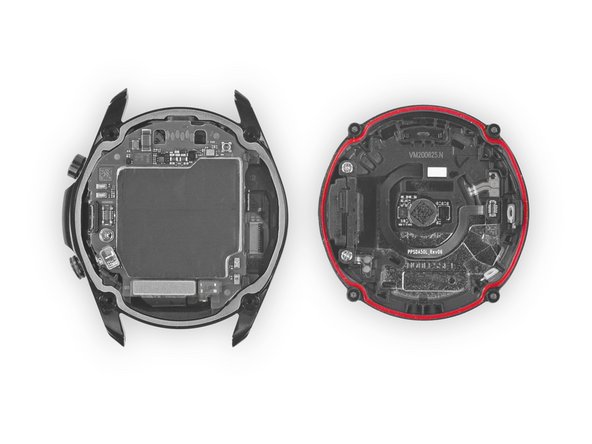
    4. Samsung Galaxy Watch3 Display Replacement, Remove the back cover: Schritt 4, Bild 1 von 2 Samsung Galaxy Watch3 Display Replacement, Remove the back cover: Schritt 4, Bild 2 von 2
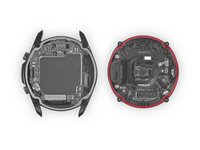
      • Remove the back cover.

      • Make sure the rubber gasket (marked red) is undamaged. If damaged replace it with a new one during reassembly to maintain proper water resistance.

      Frag FixBot

      Kommentar hinzufügen

    1. Samsung Galaxy Watch3 Display Replacement, Unplug the display connector: Schritt 5, Bild 1 von 2 Samsung Galaxy Watch3 Display Replacement, Unplug the display connector: Schritt 5, Bild 2 von 2
      • Use the flat end of a spudger to pry up and disconnect the display flex cable from the motherboard.

      Frag FixBot

      Kommentar hinzufügen

    2. Samsung Galaxy Watch3 Display Replacement, Loosen the core assembly: Schritt 6, Bild 1 von 2 Samsung Galaxy Watch3 Display Replacement, Loosen the core assembly: Schritt 6, Bild 2 von 2
      • The core's plastic frame fits tightly within the watch's metal housing.

      • Place the corner of the flat end of a spudger in the small opening of the barometric sensor, on the opposite side of the display connector.

      • Twist and tilt the spudger to lever the core assembly out of the metal housing.

      Frag FixBot

      Kommentar hinzufügen

    3. Samsung Galaxy Watch3 Display Replacement, Remove the core assembly: Schritt 7, Bild 1 von 3 Samsung Galaxy Watch3 Display Replacement, Remove the core assembly: Schritt 7, Bild 2 von 3 Samsung Galaxy Watch3 Display Replacement, Remove the core assembly: Schritt 7, Bild 3 von 3
      • Carefully thread the display flex cable through the gap on the core's plastic frame.

      • Remove the core assembly.

      Frag FixBot

      Kommentar hinzufügen

    1. Samsung Galaxy Watch3 Display Replacement, Push out the display: Schritt 8, Bild 1 von 2 Samsung Galaxy Watch3 Display Replacement, Push out the display: Schritt 8, Bild 2 von 2
      • If your display is cracked, keep glass shards contained by applying a strip of tape over the glass."

      • Use your finger to steadily push the display down through the watch's metal housing to loosen the adhesive.

      • Lightly heating the display with a hair dryer or iOpener can help soften the adhesive.

      • Remove the display.

      Frag FixBot

      Kommentar hinzufügen

Abschluss

If possible, turn on your device and test your repair before reassembly.

To reassemble your device, follow these instructions in reverse order.

Repair didn’t go as planned? Try some basic troubleshooting, or ask our Answers community for help.

Take your e-waste to an R2 or e-Stewards certified recycler.

Rückgängig: Ich habe diese Anleitung nicht absolviert.

3 weitere Personen haben diese Anleitung absolviert.

Tinte & Feder

mit

Tobias Isakeit

Mitglied seit: 03/31/14

136.609 Reputation

189 Anleitungen geschrieben

Team

Tobias Isakeit - Repairability Engineer Mitglied von Tobias Isakeit - Repairability Engineer

Business

1 Mitglied

2.268 Anleitungen geschrieben

1 Kommentar zur Anleitung

Any idea how to remove the rotating bezel?

Azhar Suhaimi - Antwort Teilen

Kommentar hinzufügen

Seitenaufrufe:

Letzte 24 Stunden: 4

Letzte 7 Tage: 30

Letzte 30 Tage: 167

Insgesamt: 12,006