Zum Hauptinhalt wechseln
Gemeinsam reparieren - Jetzt registrieren

Sony BDP-S3500 Wi-Fi Module Replacement

Was du brauchst

    1. Sony BDP-S3500 Wi-Fi Module Replacement, Front Panel: Schritt 1, Bild 1 von 2 Sony BDP-S3500 Wi-Fi Module Replacement, Front Panel: Schritt 1, Bild 2 von 2
      • Use the Phillips #2 screwdriver to remove the two 9mm screws located on the back of the device.

      Frag FixBot

      Kommentar hinzufügen

    2. Sony BDP-S3500 Wi-Fi Module Replacement: Schritt 2, Bild 1 von 1
      • Slide the top panel off towards the back of the device.

      • Remove the top panel.

      Frag FixBot

      Kommentar hinzufügen

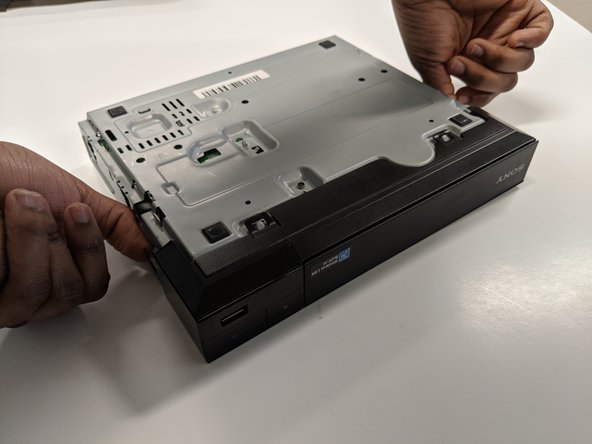
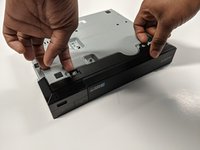
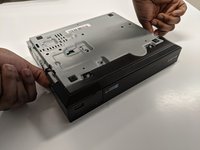
    3. Sony BDP-S3500 Wi-Fi Module Replacement: Schritt 3, Bild 1 von 2 Sony BDP-S3500 Wi-Fi Module Replacement: Schritt 3, Bild 2 von 2
      • Unclip the plastic tags from the bottom of the device.

      • Unclip the plastic tags from the sides of the device.

      • Slide the front panel off.

      Frag FixBot

      Kommentar hinzufügen

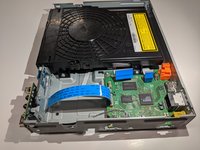
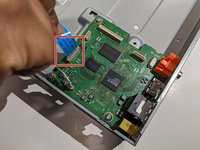
    1. Sony BDP-S3500 Wi-Fi Module Replacement, Port Board: Schritt 4, Bild 1 von 2 Sony BDP-S3500 Wi-Fi Module Replacement, Port Board: Schritt 4, Bild 2 von 2
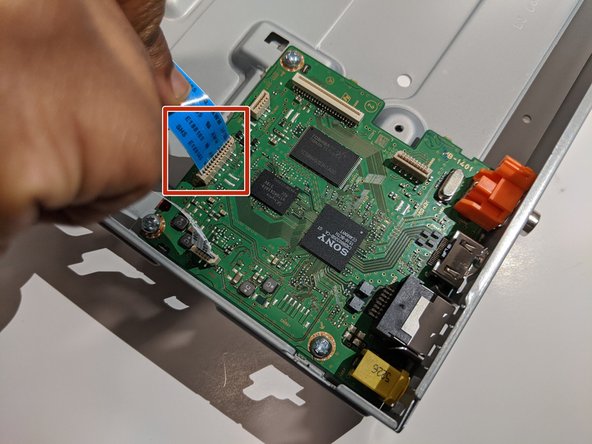
      • Keep the back side up and facing towards you.

      • Carefully disconnect the blue ribbon connecting the port board and motherboard.

      • Be delicate while removing the ribbon.

      Frag FixBot

      Kommentar hinzufügen

    2. Sony BDP-S3500 Wi-Fi Module Replacement: Schritt 5, Bild 1 von 1
      • Use a Phillips #2 screwdriver to remove the 9mm screw from the port board.

      Frag FixBot

      Kommentar hinzufügen

    3. Sony BDP-S3500 Wi-Fi Module Replacement: Schritt 6, Bild 1 von 1
      • Remove the port board from the device.

      Frag FixBot

      Kommentar hinzufügen

    1. Sony BDP-S3500 Wi-Fi Module Replacement, Wi-Fi Module: Schritt 7, Bild 1 von 1
      • Remove the white ribbon cable connecting the Wi-Fi module to the motherboard by gently pulling it out.

      Frag FixBot

      Kommentar hinzufügen

    2. Sony BDP-S3500 Wi-Fi Module Replacement: Schritt 8, Bild 1 von 1
      • Use a Phillips #2 screwdriver to remove the 7mm screw from the Wi-Fi module.

      Frag FixBot

      Kommentar hinzufügen

    3. Sony BDP-S3500 Wi-Fi Module Replacement: Schritt 9, Bild 1 von 1
      • The Wi-Fi module can now be safely removed.

      Frag FixBot

      Kommentar hinzufügen

Abschluss

To reassemble your device, follow these instructions in reverse order.

Rückgängig: Ich habe diese Anleitung nicht absolviert.

Bushra Banuso

Mitglied seit: 01/22/20

97 Reputation

1 Anleitung geschrieben

Team

York University, Team S8-G4, Turner Winter 2020 Mitglied von York University, Team S8-G4, Turner Winter 2020

YORK-TURNER-W20S8G4

4 Mitglieder

15 Anleitungen geschrieben

0 Kommentare zur Anleitung

Kommentar hinzufügen

Seitenaufrufe:

Letzte 24 Stunden: 0

Letzte 7 Tage: 9

Letzte 30 Tage: 22

Insgesamt: 763