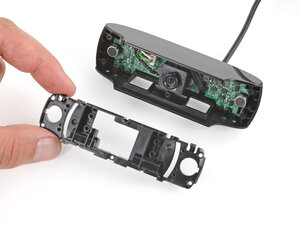
C920 Bild unscharf & Makro-Fokus hängt (Objektivring-Fehlausrichtung) reparieren

Es gibt noch keine Fragen. Stelle du die erste!
Es werden ein paar gängige Werkzeuge verwendet, um an diesem Gerät zu arbeiten. Du wirst nicht jedes Werkzeug für jeden Schritt benötigen.
Die Logitech C920 ist eine weit verbreitete externe Webcam, die für hochwertige Videokonferenzen und Content-Erstellung entwickelt wurde. Sie verfügt über ein robustes Polycarbonat-Gehäuse mit verstärktem Metall-Klemmscharnier und einer multielementaren Glaslinse zur Verbesserung von Klarheit und Langlebigkeit. Zu den Hauptmerkmalen gehören Full HD 1080p Video mit 30 fps, H.264 Hardware-Kodierung, Autofokus und zwei Stereomikrofone. Das Gerät wird mit einer universellen Klemme befestigt und verfügt über ein Stativgewinde für stabile Studio-Setups.
Die Logitech C920 kann anhand der Modellnummer (M/N VU0062) identifiziert werden. Das Modelletikett befindet sich auf der Unterseite der Kamera in der Nähe des USB-Kabelausgangs. Dieses Etikett führt die Modellnummer (M/N), Teilenummer (P/N) und Seriennummer (S/N) auf.
Häufige reparaturrelevante Fehler sind: keine Videoausgabe (oft durch beschädigtes USB-Kabel oder defekten USB-Controller verursacht), anhaltender Autofokus-Unschärfe (verschmutzte oder beschädigte Linse oder Autofokus-Aktor-Fehler) und Mikrofonausfall (lose interne Verbindung). Diagnose durch Testen der Kamera an einem anderen Computer/Anschluss, Überprüfung und Durchgangsprüfung des Kabels, Kontrolle der Linse auf Verschmutzung oder mechanische Blockierung und Überprüfung des Mikrofoneingangs in den Audio-Einstellungen des Betriebssystems.
Für weitere Hilfe bei der Fehlersuche besuche: https://support.logi.com für Treiber, Downloads und Support-Artikel für C920/C920s.
Die eingeschränkte Hardware-Garantie variiert je nach Region (üblicherweise 1 Jahr). Prüfe den Logitech Support für regionsspezifische Bedingungen.
Besonderer Dank geht an diese Übersetzer:innen:
100%
Sandra Hiller hilft uns, die Welt in Ordnung zu bringen! Wie kann ich mithelfen?
Hier starten ›
Letzte 24 Stunden: 2
Letzte 7 Tage: 13
Letzte 30 Tage: 77
Insgesamt: 770