Zum Hauptinhalt wechseln
Gemeinsam reparieren - Jetzt registrieren

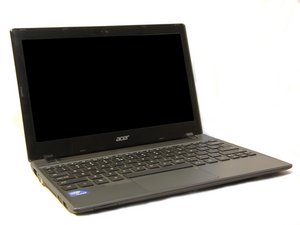
Das Acer Chromebook C710-2847 gehört zu Acers Reihe kostengünstiger Netbooks mit dem Betriebssystem Chrome OS von Google. Die Geräte sind einfach konstruiert und lassen sich mit nur einem Schraubendreher auseinandernehmen.

Keyboard With Water Involved- Need Help ASAP

My sister spilt water on my acer chromebook. Now when I type it'll mess up. Like 'h' will bring up a '/' and 2 will take you to the beginning of the sentence. My side arrows aren't working at all and I can't even log in at the moment.

Beantwortet! Antwort anzeigen Ich habe das gleiche Problem

Ist dies eine gute Frage?

Bewertung 8
11 Kommentare

i have a touch screen chromebook and it is malfunctioning with ghost clicking because i have a touch screen chromebook and i went on the google page and it said that water damage might be the problem. But the problem is i don't know how to fix a water damaged device

von

i can’t do anything on it in broke and i can’t do my password.

von

i spilled ornge juice on it now K and I key is VERY stick and hard to press i dont know what to do AND ITS NEW!!!

von

As a temporary work around you could get a Bluetooth keyboard and mouse

von

the reason that I'm speaking in to the microphone is because my keyboard don't work I'm a school ChromebookAnd that and that backspace delete delete delete delete nevermind I cannot give this to work but I really need help and I really handsome answer hey so can you please help me how to get bike when I go back to school when they coronavirus it over with covid-1910 mm please can you tell me when you haven't answer to my question I cannot get it my work cuz it's a girl it's a two-sided to spilled water on my Chromebook I'm a come up and oh my gosh this music is getting on my nerves I'm sorry CHRISTUS Health Camaro please help

von

6 weitere Kommentare anzeigen

Einen Kommentar hinzufügen

3 Antworten

Gewählte Lösung

Abygail Hicks, disassemble your computer by using these guides. or check this video. Clean all parts with a soft brush and some high grade 90%+ isopropyl alcohol. After you clean the parts, you can either let them air dry or use an oven at a low temperature (no more than 100deg Celsius for 10-20min). It sounds like you will have accidentally shorted out the keyboard and may have to replace it.

War diese Antwort hilfreich?

Bewertung 4

1 Kommentar:

About a week ago, I spilled water on my chromebook keyboard. Now the sound is not working at all. How can I fix this?

von

Einen Kommentar hinzufügen
Hilfreichste Antwort

DO NOT use a hairdryer as it will drive the water deeper. Open the machine and get the keyboard away from the logic board then dry it.

War diese Antwort hilfreich?

Bewertung 6
Einen Kommentar hinzufügen

Turn off your Chromebook and disconnect power cord. Keep it facing down (to help water/moisture get out). In addition, you can use a hair dryer to blow at the keyboard, while it faces down. But do not let the hair dryer get too close to the keyboard. For example, keep a distance of 4-6 inches. Typically, 10-15 min is sufficient. Then wait for another 10-15min. Plug back the power cord and turn it on. It should work fine. If not, repeat the procedure 2 - 3 times.

War diese Antwort hilfreich?

Bewertung 3
Einen Kommentar hinzufügen

Antwort hinzufügen

Abygail Hicks wird auf ewig dankbar sein.
Seitenaufrufe:

Letzte 24 Stunden: 0

Letzte 7 Tage: 2

Letzte 30 Tage: 17

Insgesamt: 21,717

