Zum Hauptinhalt wechseln
Gemeinsam reparieren - Jetzt registrieren

Lenovo Thinkpad E540 WiFi Card Replacement

Was du brauchst

  1. Lenovo Thinkpad E540 WiFi Card Replacement, Battery: Schritt 1, Bild 1 von 2 Lenovo Thinkpad E540 WiFi Card Replacement, Battery: Schritt 1, Bild 2 von 2
    • Push the battery release switches away from each other.

  2. Lenovo Thinkpad E540 WiFi Card Replacement: Schritt 2, Bild 1 von 1
    • Remove the battery.

  3. Lenovo Thinkpad E540 WiFi Card Replacement, WiFi Card: Schritt 3, Bild 1 von 1
    • Remove the single 1mm Phillips #0 screw holding the small plastic panel in place.

  4. Lenovo Thinkpad E540 WiFi Card Replacement: Schritt 4, Bild 1 von 1
    • Use a plastic opening tool to remove panel.

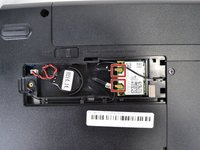
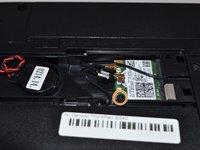
  5. Lenovo Thinkpad E540 WiFi Card Replacement: Schritt 5, Bild 1 von 2 Lenovo Thinkpad E540 WiFi Card Replacement: Schritt 5, Bild 2 von 2
    • Disconnect the two antenna cables from the wifi card.

    • Remove the single 1mm Phillips #0 screw from the wifi card.

  6. Lenovo Thinkpad E540 WiFi Card Replacement: Schritt 6, Bild 1 von 1
    • Remove the wifi card by sliding it out.

Abschluss

To reassemble your device, follow these instructions in reverse order.

3 weitere Personen haben diese Anleitung absolviert.

Team

USF Tampa, Team S2-G5, Nance Spring 2018 Mitglied von USF Tampa, Team S2-G5, Nance Spring 2018

USFT-NANCE-S18S2G5

4 Mitglieder

8 Anleitungen geschrieben

2 Kommentare zur Anleitung

Pictures show battery is still connected to laptop.

Monte Christo - Antwort Teilen

There appear to be several different wifi cards available, with different PN numbers. Is it necessary to replace with the exact same PN number? Can these wifi cards be upgraded?

Thomas - Antwort Teilen

Kommentar hinzufügen

Seitenaufrufe:

Letzte 24 Stunden: 2

Letzte 7 Tage: 21

Letzte 30 Tage: 44

Insgesamt: 3,562