
iRobot Roomba 560 Battery Replacement

Einleitung
Zu Schritt 1 der AnleitungUse this guide to replace the Roomba's battery if the device shows signs of a faulty or damaged battery. Signs of a bad battery include an inability to hold charge or a short run time while cleaning. Battery damage can be caused by overuse, or exposure to heat and water.
Was du brauchst
Ersatzteile

Werkzeuge

Mehr anzeigen …
-
-
Flip the Roomba upside down.
-
Unscrew the single 5 mm screw on the yellow side sweeper using the Phillips #2 driver.
-
-
-
-
Using the Phillips #2 driver, remove the four 10 mm screws that hold the back panel in place.
-


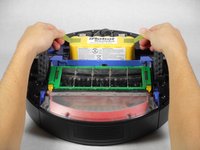
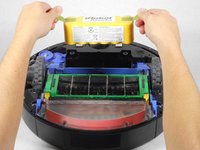
To reassemble your device, follow these instructions in reverse order.
To reassemble your device, follow these instructions in reverse order.
Rückgängig: Ich habe diese Anleitung nicht absolviert.
10 weitere Personen haben diese Anleitung absolviert.



Team

Cal Poly, Team 1-22, Maness Fall 2015 Mitglied von Cal Poly, Team 1-22, Maness Fall 2015
CPSU-MANESS-F15S1G22
4 Mitglieder
14 Anleitungen geschrieben
