Einleitung
The future is now! Apple’s once-neglected Mac mini is coming in hot with a brand new, cutting edge, long awaited … processor upgrade? And a couple more ports? There has to be more, and we know how to find it—time for a teardown!
Follow us on Facebook, Instagram, and Twitter to keep up with the latest teardown updates. Subscribe to our newsletter for teardowns delivered straight to your inbox.
Was du brauchst
-
-
This Mac might be mini, but it's packing some big specs. Let's unpack some here:
-
3.6 GHz quad-core Intel Core i3 with 6 MB shared L3 cache
-
8 GB of 2666 MHz DDR4 SO-DIMM memory
-
128 GB SSD
-
Intel UHD Graphics 630
-
802.11ac Wi-Fi + Bluetooth 5.0
-
macOS Mojave
-
-
-
Our first look at the 2018 mini's exterior gives us the warm and fuzzies—it's the same friendly form factor we remember.
-
Apart from the new color, we also have some new identifiers: model A1993 and EMC 3213.
-
Despite controversial departures from a few common ports, Apple has included plenty of them here! We spot two USB-A ports, four USB-C ports, a headphone jack, an ethernet port, and an HDMI port (which isn't available on any other recent Apple product).
-
-
-
We'd like to think we know our way in—but after four years without an update, we're not taking anything about this opening procedure for granted.
-
With some trepidation, we point our tools at the 60%-recycled-plastic bottom cover.
-
Success! An opening tool takes care of the base, and six quick stabs with the TR6 Torx security driver loosens the familiar antenna plate underneath.
-
So far so good. Fingers crossed that this keeps up!
-
-
-
Just like the last couple times we did this, we're greeted first by a single fan standing watch over the mini's insides.
-
The fan unscrews with zero fuss, giving us a better view of the mini's depths.
-
Theoretically, we just need to unplug these cables from the logic board, and it'll be free to slide right out of the chassis.
-
-
-
It's time to improvise—our handy Mac mini logic board removal tool technically fits in the logic board's screw holes, but it doesn't feel right. We're going to need more leverage.
-
Could it be that some good old-fashioned thumb pressing does the trick? It does! A firm push on either side of the blower exhaust is all it takes, and the whole board unclips and slides out.
-
Who knows, maybe Apple does have a tool to push without endangering those thin exhaust fins, but carefully aimed thumbs works for us!
-
-
-
-
With the board out, we're going straight for the RAM. Apple has trapped it in a heavy metal cage—almost as if they don't fully trust modular RAM to behave itself.
-
Twirl away four Torx screws, and the cage slides right off. Has RAM replacement ever been easier?
-
Sure it has—but, the return to standard SO-DIMM RAM after the bitter disappointment of the 2014 mini's soldered-down chips is a huge win. Upgrade now, or upgrade later—you have a choice again.
-
-
-
Just one connector and two screws sets the little system speaker free.
-
Beneath the speaker, we find some antenna cables, but unfortunately no modular AirPort card—in what is becoming a trend, these are socketed right to the main board.
-
Alas, AirPort cards are just a distant memory now that logic boards have assimilated all wireless functions.
-
From here we set to work freeing the heatsink, twirling away Torx screws and exposing the paste-y (soldered) CPU.
-
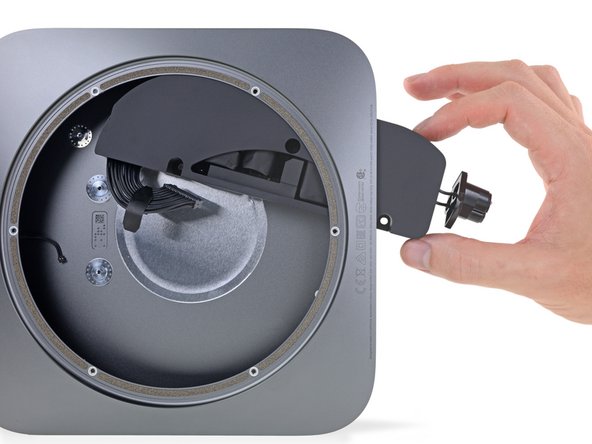
One last screw, and the port cover is free, uncovering ... the ports. As it departs, it takes some antenna hardware with it.
-
-
-
This mini still holds a lot of silicon—let's take a look!
-
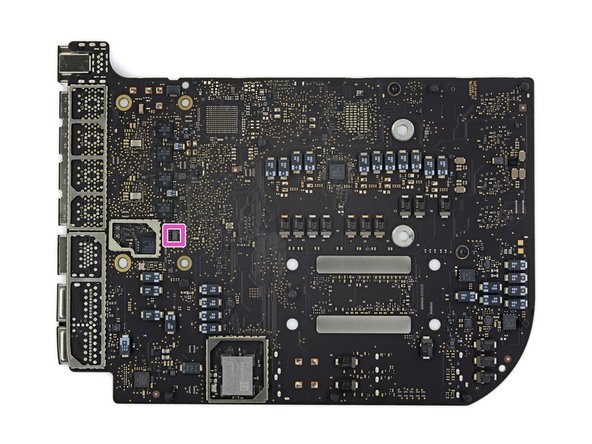
3.6 GHz quad-core Intel Core i3 CPU with Intel UHD Graphics 630
-
Toshiba TSB3225V81199TWNA1 flash storage (32 GB each, 128 GB total)
-
Apple APL1027 339S00604 T2 coprocessor
-
Intel SR40E CM246 platform controller hub
-
Intel JHL7540 Thunderbolt 3 controller
-
Broadcom BCM57766 Gigabit Ethernet controller
-
338S00342-A0 (likely an Apple PMIC)
-
-
-
And the backside holds even more:
-
Murata 339S00458 Wi-Fi / Bluetooth module
-
MegaChips MCDP2920A4 DisplayPort 1.4 to HDMI 2.0 converter
-
Cirrus Logic CS42L83 audio codec
-
Texas Instruments TPS51916 memory power solution w/ synchronous buck controller
-
Texas Instruments CD3215C00 USB-C controller x4
-
Texas Instruments CSD58872Q5D NexFET synchronized buck power block
-
Intersil ISL95828AHRTZ CPU power controller
-
-
-
Chip identification, continued:
-
Infineon (formerly International Rectifier) IRF3575 60 A synchronous buck converter
-
Renesas (formerly Intersil) ISL62383C power supply controller
-
Vishay SIC621 60 A integrated power stage
-
Renesas (formerly Intersil) ISL80101A 1 A LDO regulator
-
Texas Instruments INA210 bi-directional current sense amplifier
-
Texas Instruments INA211 bi-directional current sense amplifier
-
Texas Instruments INA214 bi-directional current sense amplifier
-
-
-
Chip identification, continued:
-
Dialog Semiconductor (formerly Adesto) AT45DB021E 2 MB serial flash memory
-
Macronix MX25R2035F 2 MB serial NOR flash memory
-
Winbond W25Q80EW 8 MB serial NOR flash memory
-
Winbond W25Q80DW 8 MB serial NOR flash memory
-
ON Semiconductor CAT24C128 128 KB serial EEPROM memory
-
Texas Instruments HD3SS215 6.0 Gbps HDMI DisplayPort differential switch
-
Diodes Incorporated PI3USB32 dual SPST USB 2.0 switch
-
-
-
Chip identification, continued:
-
Texas Instruments TMP464 5-channel temperature sensor
-
Texas Instruments TMP103 temperature sensor
-
Texas Instruments TAS5770 audio amplifier
-
Texas Instruments TPS2561 2-channel power switch
-
Apple 338S00410 power management IC
-
Texas Instruments TPS62684 1.6 A step-down converter
-
Dialog Semiconductor SLG59M301V 4 A load switch
-
-
-
The last thing between us and an empty mini is the internal power supply!
-
The linchpin holding this unit in place is a familiar one—so familiar that we follow our own repair guide to remove it.
-
The power supply is a nice enclosed unit, making for safe, easy replacement.
-
The mini power supply gets an upgrade from days past, jumping from 85 watts to 150.
-
-
-
It appears we've maxed out our mini, feast your eyes on these cool components!
-
Back in the day, a Pro Mac meant a computer you could upgrade, configure, and connect as you pleased. This new mini aligns so well with that ideal that we're surprised it didn't earn itself a "Pro" title—especially compared to the increasingly closed-off MacBook Pro line.
-
Perhaps the most exciting part of this mini is a return to upgradable RAM. In fact, our users are so excited they already made a RAM replacement guide. Stay tuned for the official guide and upgrade kits!
-
- No tough adhesive holds the Mac mini or its components hostage.
- Using fairly common tools, disassembly is straight-forward.
- The mini packs standard SO-DIMMs allowing both DIY upgrades and replacements.
- The CPU and storage are both soldered to the logic board and not user-upgradeable.
- If any of the many ports is damaged or worn, the entire logic board will need replacing.






Fazit
Reparierbarkeits-Index

(10 ist am einfachsten zu reparieren)
107 Kommentare
No. You can’t even remove the built-in SSD.
Paul -
Not only is there no room in this design, but there are also no available SATA or PCIe connectors which would allow you to upgrade the internal storage.
with that many thunderbolt ports, I think the real goal with this mini is to update it with external drives and GPUs. Upgrade the RAM and add modules, seems like a good compromisse from the 2014 model
As long as apple keeps using their private Tx chips as the ssd main controller, we are unlikely to use a common pcie ssd in those macs.
